
Most advice about what is cinematic video gets the first step wrong. It treats cinematic as a cosmetic upgrade. Add black bars, blur the background, slow a clip down, push teal into the shadows, and the footage is supposedly done.
That's not how audiences experience it.
People don't watch a video and think, “nice depth of field.” They feel that the speaker matters, the moment has weight, and the edit was shaped by someone with intent. That's the difference between a recording and a directed piece of communication. The look matters, but the look only works when it serves story, pacing, and emotional emphasis.
That distinction matters even more for podcasts, interviews, sermons, founder updates, and expert-led content. Non-fiction creators don't need to imitate movie scenes. They need to use the language of film to make ideas land harder, make authority feel earned, and help viewers stay with the message longer.
Table of Contents
- Beyond the Buzzword What Cinematic Really Means
- The Four Pillars of a Cinematic Experience
- Key Visual and Audio Elements That Create the Look
- Essential Production Techniques for Any Camera
- Cinematic Video for Podcasts and Authority Brands
- Three Paths to Cinematic Production
- Your Cinematic Checklist and Repurposing Strategy
Beyond the Buzzword What Cinematic Really Means
Cinematic video is not what makes a frame look expensive. It is what makes a message feel intentional.
Viewers rarely stop to analyze frame rate, lens choice, or background blur. They do register when a video feels considered. The subject has presence. The pacing creates anticipation. The room sounds controlled. The image supports the point instead of distracting from it. That is what cinematic really means in practice. It is direction the audience can feel.
For podcasters and authority brands, that distinction matters. A cinematic approach does not turn an interview into a movie trailer. It gives spoken ideas more weight. It helps expertise land with more confidence, makes stories easier to follow, and signals that the person on screen understands how to hold attention. In nonfiction content, cinematic craft builds trust before a viewer agrees with a single argument.
Practical rule: If a technique does not improve clarity, emotion, or emphasis, it is decoration.
That is why surface-level advice often falls short. Shallow depth of field can separate a speaker from the background, but it cannot create authority on its own. Slow motion can add emphasis, but in the wrong moment it drains energy from a point that should feel sharp and immediate. A widescreen crop can look polished, yet still feel empty if the composition, delivery, and sound are not doing a job.
Good cinematic work comes from matching form to intent. A founder explaining a hard lesson may need a steadier frame, cleaner sound, and more visual restraint so the words carry the weight. A podcast promo cut may need tighter pacing, selective punch-ins, and B-roll that turns an abstract idea into something concrete. Same brand. Different purpose.
A talking-head interview can be cinematic. So can a sermon clip, a donor appeal, a product story, or a solo monologue to camera.
The test is simple. Do the production choices help the audience understand what matters, feel what matters, and remember what matters? If the answer is yes, the video is doing more than recording. It is shaping attention.
The Four Pillars of a Cinematic Experience
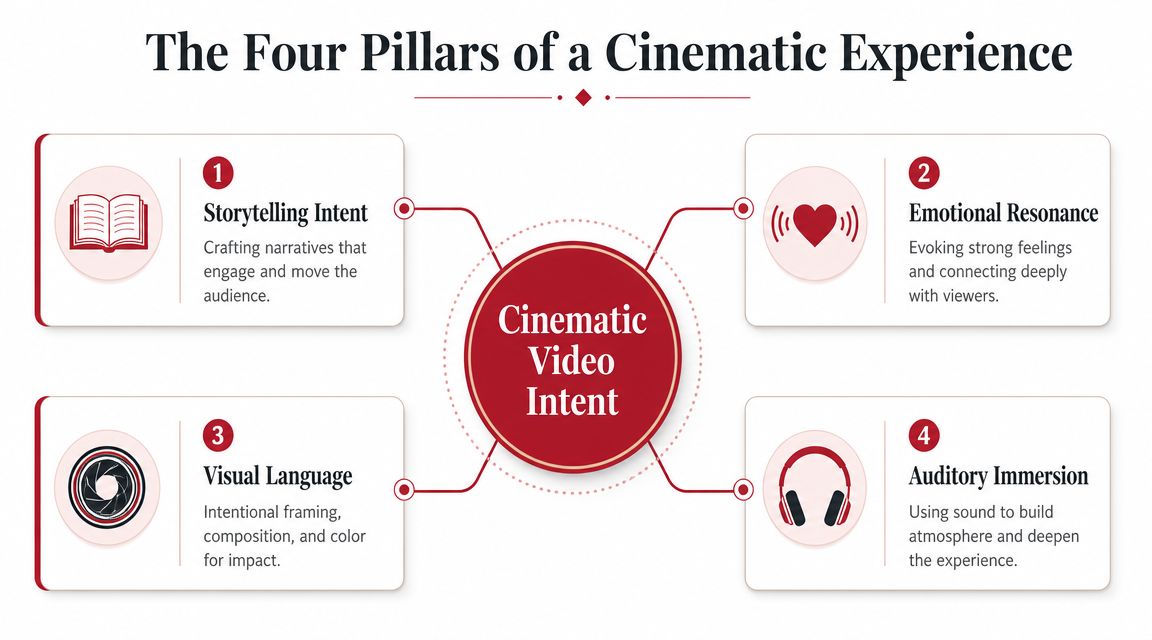
A useful way to understand cinematic production is to stop thinking like a person collecting shots and start thinking like a chef building a dish. A home cook can throw good ingredients into a pan and still end up with something flat. A chef decides what each ingredient is doing. Cinematic video works the same way.
The strongest work usually rests on four pillars. Not gear. Not plugins. Four production decisions that shape how the audience experiences the message.
Story gives the shot a job
Story isn't limited to plot twists or scripted drama. In brand and podcast work, story means progression. An idea starts somewhere, develops tension, then resolves into insight. A strong interview segment often has a built-in arc: problem, stakes, struggle, lesson.
Without that arc, polished footage still feels inert.
The common mistake is to shoot everything at the same intensity. Same framing, same pace, same delivery. A cinematic approach changes emphasis. It knows when a line needs space, when a cutaway should clarify a claim, and when silence should be left alone.
Most “cinematic” tutorials focus on blur, grading, and slow motion. The stronger explanation ties cinematic work to storytelling intent, viewer emotion, pacing, and composition, not just effects or gear, as noted in Insta360's discussion of cinematic videography.
Light sound and motion shape meaning
Light does more than expose a face. It tells the viewer how to feel about the speaker. Soft frontal light can feel open and trustworthy. Side light can add gravity or tension. Background separation can make a guest feel intentional rather than dropped into a random office.
Sound is where many otherwise strong videos collapse. Clean dialogue is the baseline, not the finish line. Room tone, ambient texture, music choice, and transitions all influence how polished and immersive the piece feels. For spoken-word content, sound often carries more authority than the image.
Motion has to be motivated. A camera move should reveal context, follow emotion, or shift perspective. If the camera drifts for no reason, the audience feels the trick. If it moves because the thought is expanding or the emotional beat is changing, the movement feels earned.
These pillars work together. Great lighting can't rescue a shapeless edit. Great sound can't fix a weak frame. A cinematic result happens when the viewer feels intention in all of them at once.
Key Visual and Audio Elements That Create the Look
People usually point to the obvious cues first. Black bars, soft backgrounds, moody color, slow camera moves. Those can help, but cinematic video earns its effect through control. Every visual and audio choice tells the viewer what matters, how to feel, and why this speaker is worth listening to.

Frame rate aspect ratio and composition
Motion cadence is one of the first signals viewers notice, even if they cannot name it. A cinematic feel is often tied to 24 fps because the motion blur looks familiar from film and scripted television. Wider aspect ratios can also make a frame feel more deliberate and spacious, but the crop only works if the shot was designed for it.
For podcasters and authority brands, composition should do a job. It should rank information inside the frame.
- Fill the frame with the subject when the value is conviction, vulnerability, or a sharp point of view.
- Show more environment when the setting adds credibility, such as a treatment room, studio desk, workshop, or office.
- Use background detail selectively so props support expertise instead of reading as clutter.
This is one of the clearest differences between recording and storytelling. A standard talking-head setup captures a person speaking. A cinematic setup frames the person in a way that supports the message. Eye line, headroom, distance from background, and the direction the subject faces all shape how confident, intimate, or authoritative the piece feels.
Camera movement follows the same rule. Good movement has a reason. A slow push-in can add pressure to an important claim. A lateral move can reveal context or give a static interview more energy. Random drift usually weakens trust because it feels decorative. Anyone studying cinematic camera movements will notice that the useful moves guide attention instead of asking for attention.
Color depth and sound design
Color should support credibility before it adds style. For nonfiction content, that usually means consistent skin tones, controlled contrast, and a palette that matches the brand without overpowering the speaker. Heavy grading can work for a campaign piece, but in podcasts, interviews, and expert-led content, aggressive looks often make the production feel less trustworthy.
Depth of field is similar. A softer background can help direct the eye, especially in a busy office or studio. Too much blur creates its own problems. Microphones drift soft, hand gestures lose clarity, and the image starts to feel like it is trying too hard to look expensive.
Audio carries more authority than many teams expect.
Viewers will forgive a simple frame long before they forgive hollow dialogue, harsh room reflections, or music that fights the voice. Clean speech, controlled ambience, thoughtful pauses, and transitions that do not call attention to themselves make spoken-word content feel composed. Teams producing interviews or branded podcasts often get better results by fixing structure and clarity in post through a dedicated podcast audio editing workflow before spending money on more camera gear.
A short visual example helps show how these choices combine in practice.
Good cinematic style reduces distraction, strengthens meaning, and makes expertise feel intentional.
Essential Production Techniques for Any Camera
Most creators don't need a cinema camera to make their work feel more cinematic. They need fewer random choices. Technique matters more than price when the goal is authority, clarity, and mood.
Start with settings that support intent
A widely used benchmark is 23.98/24 fps with a 180-degree shutter angle, or about 1/48 second at 24 fps, because that combination creates the motion blur viewers associate with cinema. Many productions also capture at 3840×2160 UHD to preserve flexibility for reframing and widescreen crops, as specified in ASU's production guidelines.
Three decisions should be locked before the shoot:
- Choose frame rate first. If the project is meant to feel cinematic, commit to 24 fps instead of mixing casual high-frame-rate footage into the main interview.
- Match shutter to frame rate. If the motion blur is wrong, footage often feels brittle or overly sharp.
- Decide the delivery frame early. If the final piece will live in 16:9, vertical, or a wider crop, the composition should be built for that from the start.
A frequent mistake is shooting loosely and hoping the edit will “find” the cinematic frame later. Cropping can help, but heavy cropping also reduces options and can create awkward compositions.
Use simple setups with disciplined choices
A basic lighting setup can go a long way. One key light, one practical light in the background, and deliberate subject-to-background distance can create depth without turning the room into a gear showroom. Window light also works well if the subject is positioned intentionally and the background is controlled.
A few production habits improve almost any camera package:
- Increase subject separation. Move the speaker farther from the background so the image gets depth even before lens blur enters the equation.
- Reduce visual clutter. Remove bright objects, messy shelves, and stray cables that compete with the face.
- Motivate movement. If the camera slides or pushes in, tie that movement to an emotional beat or a key line.
- Capture cutaways with purpose. Hands, notes, studio details, audience reactions, and relevant b-roll should clarify the idea, not just fill dead air.
A locked-off shot can feel more cinematic than a moving one if the frame is stronger and the moment carries more weight.
Phone cameras can also benefit from this discipline. They won't mimic every optical trait of larger sensors, but they can still produce strong results with controlled light, stable framing, clean sound, and a planned edit.
Cinematic Video for Podcasts and Authority Brands
For podcasters, consultants, nonprofits, and founders, cinematic production isn't about vanity. It's about message value. The same idea can land as disposable content or as a memorable authority piece depending on how it's framed, lit, edited, and scored.
Authority is a production decision
The business case for video is already strong. 91% of businesses reported using video as a marketing tool, 87% reported that video marketing significantly increased lead generation, and companies using video marketing grow revenue 49% faster, according to Charter & Company's video marketing statistics roundup.
For authority brands, cinematic treatment helps convert that broad business value into a more specific impression. It can make an interview feel premium, make a teaching segment feel trustworthy, and make a simple founder message feel like a considered point of view rather than a webcam upload.
That matters in formats people often underestimate:
- Expert interviews benefit from visual hierarchy. A wide opener, a medium main angle, and selective b-roll can turn abstract advice into a guided experience.
- Podcast trailers need compression and momentum. Strong music, purposeful cutdowns, and clean visual rhythm can make a short trailer feel substantial.
- Mission-driven content often carries emotion better when lighting, sound, and pacing create space for sincerity instead of rushing every beat.
One practical route is to build the long-form episode with enough visual variation that it can later support shorts, clips, and teasers. Teams exploring that format often start with a guide to how to start a video podcast so the production plan supports both long-form and repurposed assets.
Short clips still need cinematic intent
Short-form doesn't excuse careless production. It increases the cost of every weak decision because the audience judges the content in seconds. That's why creators working on platform-native clips often study resources like OneURL's TikTok video creation tips. The useful lesson isn't to mimic trends blindly. It's to understand pacing, hook construction, framing, and visual clarity under tight time constraints.
A cinematic brand clip doesn't need to be slow or moody. It needs to feel deliberate. Fast edits can still feel cinematic if each image choice reinforces the point and the rhythm supports comprehension instead of chaos.
Three Paths to Cinematic Production
Cinematic production is a resource decision before it is a gear decision. For podcasters and authority brands, the right path depends on which resource runs out first. Cash, team hours, or creative focus.
A polished frame can make a brand look credible. A repeatable production system builds authority over time. Those are different goals, and they justify different levels of support.
What each path really costs
Low-budget production often gets mislabeled as cheap. In practice, the hidden cost shows up in founder time, missed posting windows, uneven quality, and episodes that never get cut into useful clips. If the content is meant to support trust, sales conversations, or long-term audience growth, those trade-offs matter.
Here's the practical comparison.
| Approach | Cost | Time Investment | Best For |
|---|---|---|---|
| DIY Hustler | Low cash outlay, higher hidden effort | High | Solo creators testing format and building basic reps |
| Hybrid Approach | Moderate | Medium | Brands with some internal capacity but gaps in filming or editing |
| Full-Service Studio | Higher cash outlay, lower internal labor | Low to medium | Teams using content as a serious authority and lead-generation channel |
Where each approach fits
DIY Hustler
This route fits creators who need repetitions more than polish. A phone or mirrorless camera, one reliable light, a decent mic, and disciplined framing can produce credible work. The trade-off is consistency. One person usually ends up directing, monitoring audio, performing on camera, and editing, which makes storytelling choices weaker under pressure.
For a podcaster, that often means the episode gets recorded but not shaped. You get footage, yet the show still feels like documentation instead of a point of view.
Hybrid Approach
Hybrid is often the smartest option for brand teams. Keep strategy, messaging, and hosting in-house. Bring in specialists where mistakes are expensive, usually sound, color, editing, or capture-day execution.
This path works especially well when the goal is authority content that has to live in several formats. The full episode needs depth. The clips need clean hooks. The social cutdowns need pace without losing credibility. A strong content repurposing strategy for podcasts and brand video usually starts here, because the team can keep control of the message while outsourcing the technical finish.
Teams trying to stretch one recording across channels can also learn from ChurchSocial.ai's guide, which shows how one core piece can be adapted into multiple assets without repeating the same post everywhere.
Full-Service Studio
Full-service support makes sense when content is tied directly to brand perception, audience trust, or pipeline. The value is not just nicer lighting. It is having a crew that can shape the environment, protect audio quality, direct performance, and build a post workflow that turns one recording session into a usable content library.
Get Up Productions is one example of that model, with in-studio and remote podcast production, post-production, and repurposing support for shows built around authority and audience growth.
The right choice is the one that protects the resource you cannot afford to waste. If the team has time, DIY can work. If the message is strong but execution keeps breaking down, hybrid usually fixes the gap. If content is already a serious business asset, full-service production gives the brand consistency, speed, and a stronger final result.
Your Cinematic Checklist and Repurposing Strategy
A cinematic result is usually decided before record is pressed. Planning sharpens the footage. It also makes repurposing easier because the team knows which moments, angles, and sound bites are being captured for later use.
A checklist before the camera turns on
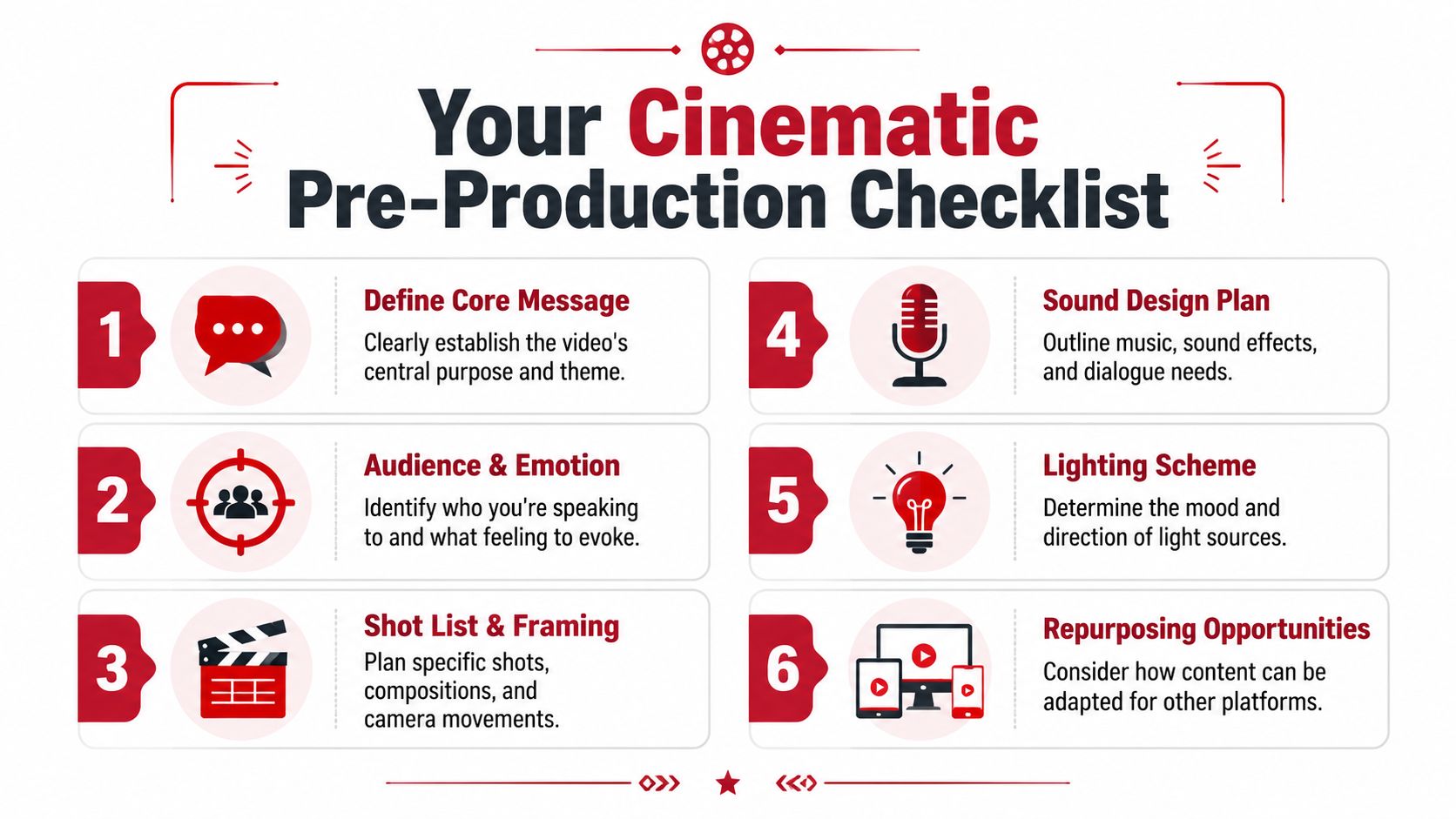
A simple pre-production checklist prevents most of the problems that people try to fix in post.
- Define the core message. Decide the one idea the audience should remember after the video ends.
- Choose the target emotion. Trust, urgency, reflection, confidence, and empathy all require different pacing and framing.
- Build a shot list. Include the interview framing, detail shots, environmental b-roll, and any movement that needs to happen.
- Plan the sound. Decide whether the piece needs music, room tone, ambient texture, or moments of intentional silence.
- Design the light. Match the lighting mood to the message instead of defaulting to flat brightness.
- Flag repurposing moments. Mark strong hooks, quotable lines, visual demos, and emotional peaks.
The easiest footage to repurpose is footage that was shot with multiple end uses in mind.
One long-form shoot can fuel a content system
The smartest cinematic workflow doesn't stop at the full episode. It turns one polished recording into a stack of useful assets. A compelling interview can become short vertical clips, teaser trailers, audiograms, quote graphics, and platform-specific edits.
That kind of content waterfall works best when the original production includes intentional pauses, alternate framings, strong openers, and supporting b-roll. Teams looking for tactical repurposing ideas can borrow from ChurchSocial.ai's guide to repurposing content and then adapt the approach to podcasts, expert interviews, and branded thought leadership.
For organizations that want a more structured system, a dedicated content repurposing strategy helps connect the shoot plan to the publishing plan so the production day supports weeks of distribution instead of one upload.
Cinematic video doesn't require Hollywood gear. It requires deliberate choices about story, light, sound, motion, and how the footage will work after the edit. Brands, podcasters, and mission-driven teams that want that kind of production support can explore Get Up Productions for turnkey podcast and video workflows built around authority-focused content.