
A lot of teams are sitting on a strong video podcast and treating it like a single post. They record the episode, publish it to YouTube or Spotify, share it once on LinkedIn, then move on to the next production cycle. That’s where the waste happens.
A video podcast is not one asset. It’s a content source file for an entire campaign. When the production is solid, the host has clear opinions, and the episode addresses real buyer or donor questions, that one recording can support short-form video, email, blog content, sales follow-up material, social proof, and platform-native posts for weeks.
That shift matters because attention is fragmented and content calendars are unforgiving. A serious content repurposing strategy turns the heavy lift of recording into a repeatable system that supports lead generation, donor engagement, and authority building without forcing a team to reinvent the message every few days.
Table of Contents
- Beyond Publish and Pray Why Repurposing Is a Multiplier
- Lay the Foundation with Goals and a Content Audit
- Design Your Content Waterfall Map
- Build Your Repurposing Production Engine
- Schedule and Distribute for Maximum Reach
- Measure Success and Avoid Common Pitfalls
Beyond Publish and Pray Why Repurposing Is a Multiplier
Publishing once and hoping the right people happen to see it is a weak operating model. It assumes the audience is waiting in one place, in one format, at one moment. That isn’t how buyers, donors, or decision-makers consume content.
A video podcast demands planning, prep, recording, editing, and approvals. Letting that effort end with a single upload means the highest-cost asset in the content stack has the shortest useful life. That’s why repurposing isn’t a shortcut. It’s a multiplier.
A ReferralRock survey found that 94% of marketers already repurpose content, and the remaining 6% plan to adopt it soon, which makes repurposing close to universal in modern marketing practice, as cited in this content repurposing statistic roundup. The point isn’t that everyone is doing it. The point is that teams that don’t build a system for it are competing at a disadvantage.
The mindset shift that changes everything
The right way to look at a podcast episode is this:
Practical rule: Treat the full episode as the raw material for a campaign, not the finished product.
That changes the brief before the cameras even turn on. Instead of asking, “What should this episode be about?” the better question is, “What assets should this episode produce?”
That’s where the Content Waterfall approach earns its keep. One pillar episode flows downstream into smaller pieces, each built for a different job. A short clip can stop a scroll. A quote card can reinforce a point. A blog post can capture search intent. An email can bring people back to the episode. A sales rep can send a relevant clip after a discovery call.
For teams that need a clean explanation of the difference between reposting, cross-posting, and actual adaptation, this content repurposing guide is a useful reference. The distinction matters because copying the same file everywhere isn’t strategy. It’s distribution without context.
What repurposing does that one-time publishing doesn't
A strong repurposing system helps in four practical ways:
- It increases surface area: More assets create more chances for the right person to encounter the message in a format they’ll consume.
- It extends shelf life: A single recording session can support a calendar instead of a one-day spike.
- It sharpens positioning: Repeating the same core idea through different angles makes a brand easier to remember.
- It lowers creative strain: Teams spend less time inventing net-new topics and more time extracting value from proven ones.
One recorded conversation can answer objections, generate follow-up content, and supply sales enablement material if the episode is built with extraction in mind.
That’s the difference between content production and content operations. One creates episodes. The other builds momentum.
Lay the Foundation with Goals and a Content Audit
Repurposing falls apart when teams start with tools. Descript won’t fix weak positioning. Canva won’t make random clips meaningful. A content repurposing strategy works when every asset has a job tied to a business outcome.

Start with the business outcome
The first decision is simple. What is the podcast supposed to do?
In many cases, the answer usually lands in one of these buckets:
- Generate leads: The episode should create demand, qualify interest, and push prospects toward inquiry or booking.
- Support donor engagement: The content should build trust, tell real stories, and create repeat touchpoints that keep supporters close.
- Build authority: The host needs to become easier to trust before a sale or donation conversation starts.
If the goal is lead generation, clips should move people toward a next step. If the goal is donor engagement, story-based excerpts may matter more than hot takes. If the goal is authority, the assets need to show depth, consistency, and clarity.
That’s also why teams should connect the podcast plan to the broader program before they record. A practical starting point is a launch framework like this guide on how to start a video podcast, because format and episode design directly affect what can be repurposed later.
Run a high-performer audit
Most companies already have clues about what deserves repurposing. They just haven’t organized them.
Start by reviewing past episodes, webinars, interviews, or long-form videos. The goal is not to find the “best” piece in the abstract. The goal is to find assets that triggered a useful audience response.
Look for signals like these:
- Strong watch behavior: Episodes that held attention longer usually contain clearer hooks, tighter structure, or stronger topic-market fit.
- Specific comments: Questions, objections, and “this was helpful” replies often point to segments worth isolating.
- Sales relevance: If prospects mention an episode in a call or a rep shares it during follow-up, that content already has downstream value.
- Repeat themes: Topics that keep resurfacing in sales calls, DMs, onboarding, or donor conversations deserve another life in new formats.
A repurposing audit should feel more like revenue planning than content housekeeping.
Match content signals to business signals
Often, a lot of teams stay too shallow. They track views and stop there. That’s not enough.
One source on systematic repurposing notes that B2B teams commonly track conversions, email engagement and traffic, and social analytics, with 73% tracking conversions, 71% tracking email engagement and traffic, and 65% tracking social analytics in order to connect content to revenue outcomes in a repurposing workflow guide. That framework is useful because it forces content teams to look beyond vanity reach.
A simple audit table helps.
| Content asset | Audience response | Business relevance | Repurpose priority |
|---|---|---|---|
| Full episode with strong retention | People stayed engaged and asked follow-up questions | High if topic matches sales or donor conversations | High |
| Episode with weak retention but a strong opening segment | Hook works, middle drags | Good candidate for clips, not full-episode push | Medium |
| Topic with lots of views but weak inquiry quality | Broad interest, low intent | Useful for awareness, not direct lead focus | Medium |
| Niche episode referenced by prospects | Smaller audience, stronger fit | High commercial value | High |
The highest-performing episode on the dashboard isn’t always the most valuable one. For B2B teams, the better question is which asset attracts the right conversations.
The output of this stage should be short and clear. Pick a business goal, identify a handful of episodes with proof of relevance, and define what success should look like before editing starts.
Design Your Content Waterfall Map
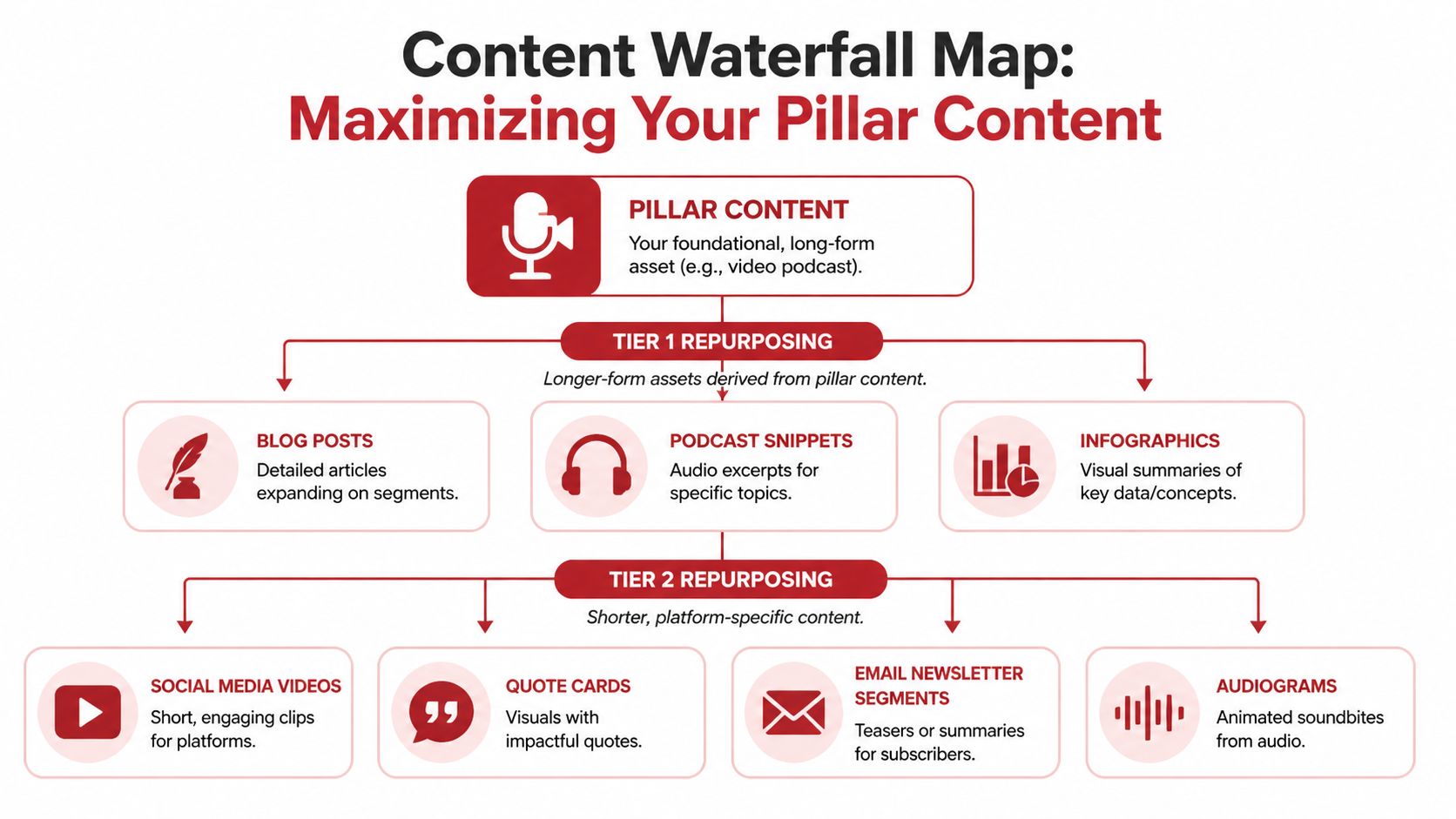
The waterfall map is the operating blueprint. Without it, repurposing becomes reactive. Teams cut a few clips, post them when there’s a gap in the calendar, and call it a strategy. That usually produces disconnected assets with no clear role.
The better model is structured extraction. Every episode should break into tiers, and each tier should support a different point in the audience journey.
A visual map makes that easier to manage.
Start with the pillar asset
The pillar is the full video podcast episode. It holds the complete argument, the full story, or the full interview. This version is where trust compounds because the audience can spend real time with the host.
But the pillar only works if the episode is planned for extraction. That means clean topic framing, distinct segments, strong transitions, and answers that can stand alone without five minutes of setup. A rambling episode is hard to repurpose because every clip needs extra context.
A strong pillar usually includes:
- A clear thesis: One central idea the audience can repeat later.
- Distinct segments: Natural chapter breaks create clean extraction points.
- Memorable lines: Strong phrasing becomes clip hooks, quotes, and captions.
- Useful specificity: Real examples, process language, and decision criteria travel well across formats.
Build tier 1 from direct lifts
Tier 1 assets come straight from the episode with minimal transformation. These are the quickest pieces to produce and often the first to publish.
That usually includes vertical video clips for Shorts, Reels, and TikTok. In B2B, this format deserves serious attention. Recent HubSpot data shows repurposed video shorts deliver 3x higher lead conversion rates, 12% versus 4% for static posts, according to this repurposing across platforms article.
That doesn’t mean every clip should be a teaser. The strongest ones often function as complete ideas. They answer a narrow question, challenge a common assumption, or tell one compact story. The viewer should get value even if they never click through.
A short educational explainer can also help teams see how a waterfall structure works in practice:
Build tier 2 from transformations
Tier 2 is where the raw conversation turns into other content types. This is not clipping. It’s adaptation.
Examples include:
- A blog post: Built from the transcript, then rewritten so it reads cleanly and serves search intent.
- An audiogram: Useful when a moment is strong in audio and doesn’t rely on visuals.
- A quote graphic: Best for sharp phrasing or concise positioning statements.
- An email segment: A short lesson or story excerpt that brings subscribers back into the campaign.
This is the tier where one episode starts serving multiple teams. Marketing gets social and email assets. Sales gets proof-of-expertise snippets. Leadership gets a polished thought leadership piece. Community teams get story-led content they can use in outreach.
Use tier 3 for atomic distribution
Tier 3 is the smallest unit of useful content. It often looks simple, but it’s where consistency comes from.
Think of tier 3 as the pieces that fill the content calendar without inventing a new topic every time:
- LinkedIn text posts built from one opinion in the episode
- Carousel slides built from a short framework
- Sales follow-up notes that reference a specific clip
- Newsletter intros that summarize a single lesson
- Comment prompts pulled from a strong question raised in the conversation
A basic waterfall map can be sketched like this:
| Tier | Asset type | Main job |
|---|---|---|
| Pillar | Full video podcast episode | Depth, trust, authority |
| Tier 1 | Vertical clips and excerpt videos | Reach, discovery, lead capture |
| Tier 2 | Blog posts, audiograms, quote graphics, email content | Education, nurture, SEO, reuse across channels |
| Tier 3 | Text posts, carousels, snippets, follow-up copy | Consistency, touchpoints, distribution support |
The map should tell a team what gets made, where it gets published, and why it exists. If an asset has no job, it shouldn't be in the workflow.
Build Your Repurposing Production Engine
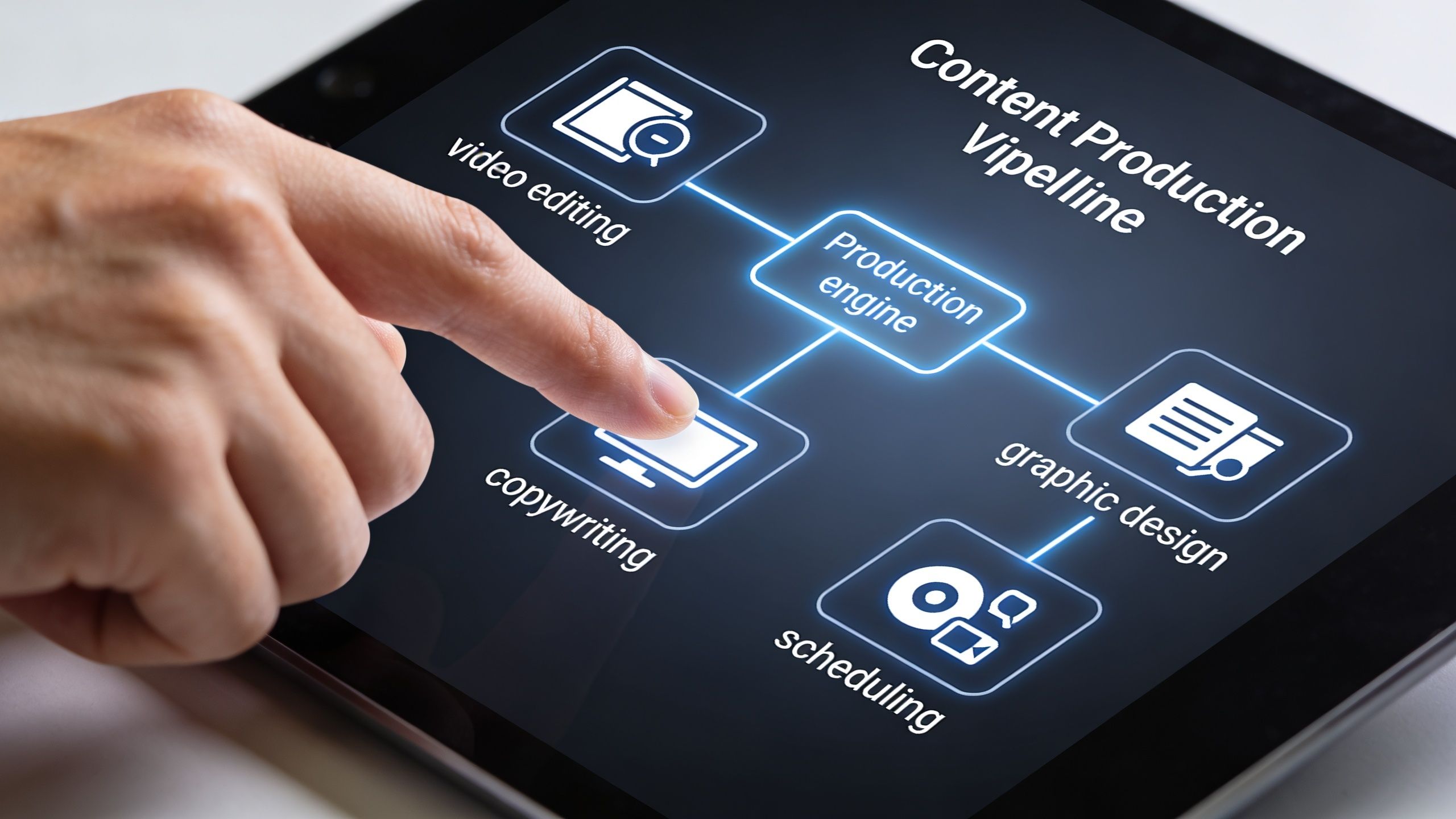
A waterfall map without an execution system creates backlog. The missing piece is the production engine: tools, templates, roles, and approval flow.
Choose tools that remove bottlenecks
The tool stack should solve practical problems, not add novelty.
Descript is useful for transcript-based editing and clip discovery. Canva works well for repeatable quote graphics and simple carousels. Scheduling platforms like Buffer or Later help move approved assets into a calendar. A project system like Airtable, Notion, or Trello keeps the asset list visible.
For teams exploring AI-supported workflows, this guide to automating video clipping is a practical resource because it frames automation as a way to speed first-pass extraction, not replace editorial judgment.
Platform behavior also matters at the production stage, not just at publishing time. A projection cited by IPREX says TikTok’s 2026 algorithm prioritizes remixable short-form from long-video sources and can boost reach by 40% when paired with user-generated calls-to-action, as described in this platform-aware repurposing article. Since that claim is future-dated, it should be treated as directional planning, not a present guarantee. The operational takeaway is still useful: teams should design clips that can be remixed, responded to, and reinterpreted on-platform.
Use templates so quality stays consistent
Templates do more than save time. They preserve standards.
Without templates, every short clip gets a different caption style, every quote graphic uses a different layout, and every editor makes avoidable decisions from scratch. With templates, the team can move faster while keeping the brand recognizable.
Useful template categories include:
- Clip templates: Hook text placement, subtitle style, framing rules, and end-screen CTA.
- Quote card templates: One for bold statements, another for story excerpts, another for statistics.
- Caption frameworks: Short educational, contrarian point, story-driven, and CTA-led variants.
- Thumbnail systems: Consistent visual language for the full episode and for major clips.
One operational option for teams that don’t want to build the entire pipeline internally is a managed service such as podcast marketing services, which can handle production and multi-platform repurposing alongside in-house efforts.
Assign roles even on a small team
Most repurposing problems are role problems. Everyone assumes someone else is choosing clips, writing copy, naming files, or checking links.
Even a lean team needs named ownership. A simple split works:
| Role | Responsibility |
|---|---|
| Producer | Defines the asset list and approves the editorial angle |
| Editor | Pulls clips, cleans the timeline, exports source files |
| Copy lead | Writes captions, post copy, email blurbs, and titles |
| Designer | Applies branded templates to static assets |
| Scheduler | Publishes, tags links, and tracks performance inputs |
If one person handles multiple roles, that’s fine. The key is that the tasks are still distinct.
A repurposing engine breaks when everyone is busy but nobody owns the handoff.
The most effective production engines are boring in the best way. The file naming is clean. The templates are ready. The approvals are simple. The same sequence runs every episode.
Schedule and Distribute for Maximum Reach
It is common for all effort to be compressed into launch day. Teams publish the episode, post one clip, maybe send one email, then the campaign disappears. That creates a spike without follow-through.
Stop thinking in launch days
A video podcast should run on a rolling distribution cycle. The full episode is only the first release. The main value comes from timed follow-up assets that keep resurfacing the core idea in different formats.
That requires a calendar linked to the waterfall map, not a pile of exported files. The calendar should stagger formats so the audience doesn’t see the same message repeated the same way.
A team building that cadence should also connect the posting plan to a broader podcast marketing strategy so episode launches support campaigns, audience growth, and conversion paths instead of living in isolation.
A simple distribution rhythm
A practical sequence for one episode might look like this:
- Day one: Publish the full episode on the primary long-form platform with a strong title, description, and CTA.
- Day two: Release the first short clip built around the strongest hook or problem statement.
- Day four: Publish a LinkedIn post based on one key argument from the episode.
- Day six: Send an email excerpt with one lesson and a link back to the full episode.
- Day eight: Publish a second clip focused on a different audience pain point.
- Day ten: Post a quote card or carousel that distills a framework from the conversation.
- Day twelve and beyond: Use additional clips, replies, and follow-up posts to extend the campaign.
This rhythm works because the audience rarely consumes every piece. Repetition across formats is usually reinforcement, not fatigue.
Tailor the post to the platform
Distribution gets stronger when the post feels native to the channel.
A vertical clip on Instagram needs a tighter caption and a faster hook than a LinkedIn video post. A LinkedIn text post should frame a business insight or decision point. An email should feel like useful correspondence, not social copy pasted into an inbox. YouTube descriptions should support search and next-step viewing.
A basic platform check before publishing helps:
- Format fit: Does the asset match how the platform is typically consumed?
- Hook fit: Does the opening line work for that feed?
- CTA fit: Is the next step realistic for that channel?
- Tracking fit: Is the link tagged so the team can see which assets generate useful traffic?
Posting the same asset everywhere saves minutes and wastes opportunities.
UTM tagging matters here because distribution without attribution leaves the team guessing. Every campaign should create a clear path back to the originating episode and to the business action that matters.
Measure Success and Avoid Common Pitfalls
Repurposing only becomes a system when the team closes the loop. That means checking whether the assets produced the intended response, then changing the workflow based on evidence.
Build a small dashboard that answers real questions
A useful dashboard doesn’t need to be complex. It needs to help a team decide what to make next.
Track a small set of questions tied to the original goal:
- Which clips generated meaningful engagement? Not just reactions, but comments, saves, replies, or direct inquiries.
- Which assets drove traffic? UTM-tagged links show what moved people off-platform.
- Which pieces supported conversion behavior? That might be booked calls, subscriber actions, form fills, or donor actions.
- Which topics kept showing up in conversations? Sales calls, DMs, and community replies often reveal stronger signal than surface reach.
A good review process combines platform analytics with sales or community feedback. If a low-view clip repeatedly gets shared in actual deal conversations, it has more strategic value than a flashy post that attracts the wrong audience.
Three mistakes that weaken returns
Some repurposing problems are easy to spot once a team knows what to look for.
Zombie repurposing happens when a clip is technically clean but stripped of context. The viewer hears a sentence with no setup and no payoff. The fix is editorial, not technical. Start the clip where the idea becomes clear, not where the speaker happened to begin.
Platform-agnostic posting shows up when the same asset, same caption, and same framing go everywhere unchanged. That usually flattens performance because each network has different expectations and consumption patterns.
The vanity metric trap is the most common mistake. Teams celebrate views, likes, and reach while ignoring whether the content led to qualified conversations, email activity, inquiries, or donor response.
A short review checklist keeps this grounded:
| Check | What to ask |
|---|---|
| Context | Can a new viewer understand the clip without watching the full episode first? |
| Relevance | Does this asset support the business goal chosen at the start? |
| Native fit | Was the asset adapted for the platform instead of copied over? |
| Attribution | Can the team trace traffic or response back to the asset? |
| Reuse potential | Should this piece be reposted, re-edited, or turned into another format? |
The strongest content repurposing strategy is rarely the busiest one. It’s the one that keeps learning. Each episode improves the next map, the next workflow, and the next campaign.
A strong video podcast shouldn't end at publish. Get Up Productions helps brands turn each episode into a structured Content Waterfall with long-form production, short-form assets, and distribution-ready content built to support leads, authority, and ongoing audience engagement.