
A strong recording session ends the same way for almost everyone. The conversation felt sharp, the guest brought useful ideas, and the host sounded natural. Then the true work starts. There's a rough file on a hard drive, maybe a second file from a remote guest, a few awkward pauses, some room noise, and a growing question about how much time post-production is about to take.
That's where many individuals choose podcast editing software the wrong way. They compare feature lists, scan pricing pages, and pick the tool with the most buttons or the cheapest plan. Neither approach solves the actual problem. The right question isn't “Which editor has the longest feature list?” It's “Which setup helps turn raw recordings into polished episodes without slowing down everything else the team needs to publish?”
For a solo creator, that might mean a tool that cuts cleanup time and doesn't require audio-engineering skills. For a marketing team, it might mean software that supports repeatable workflows, shared handoffs, and repurposing into clips, transcripts, and video assets. For a founder or thought leader, it often means protecting the natural voice of the show while removing distractions that make the content sound amateur.
Good podcast editing software saves time and protects credibility. Bad-fit software creates bottlenecks, even when it's powerful.
Table of Contents
- Introduction
- What Is Podcast Editing Software Really Doing
- The Two Main Types of Editing Software
- Key Editing Features That Actually Matter
- Sample Workflows for Different Podcasters
- How to Choose the Right Software for Your Goals
- When Your Best Software Is a Service
Introduction
Most new podcasters don't need more software options. They need a clearer decision.
The recording is already done. Now someone has to clean it up, shape the pacing, fix uneven levels, and get it ready to publish without turning a single episode into a multi-day project. That's the point where podcast editing software stops being a technical purchase and becomes an operations choice.
A lot of advice in this category still treats every tool like a standalone editor. That misses how modern podcast production works. An episode rarely ends as one audio file anymore. Teams want a full episode, short clips, transcripts, quote graphics, maybe video segments, and a process they can repeat next week without reinventing it.
Practical rule: Choose software around the work that happens after recording, not the demo features on the homepage.
That's why a beginner doesn't always need a professional DAW, and a growing brand shouldn't always settle for the fastest one-click editor. The best fit depends on how much control is needed, how much time is available, and whether the show is only being published or being turned into a broader content engine.
Podcast editing software should make two things easier. It should help the show sound professional, and it should reduce the friction between recording day and distribution day. If it only does one of those jobs, it's not a great fit.
What Is Podcast Editing Software Really Doing
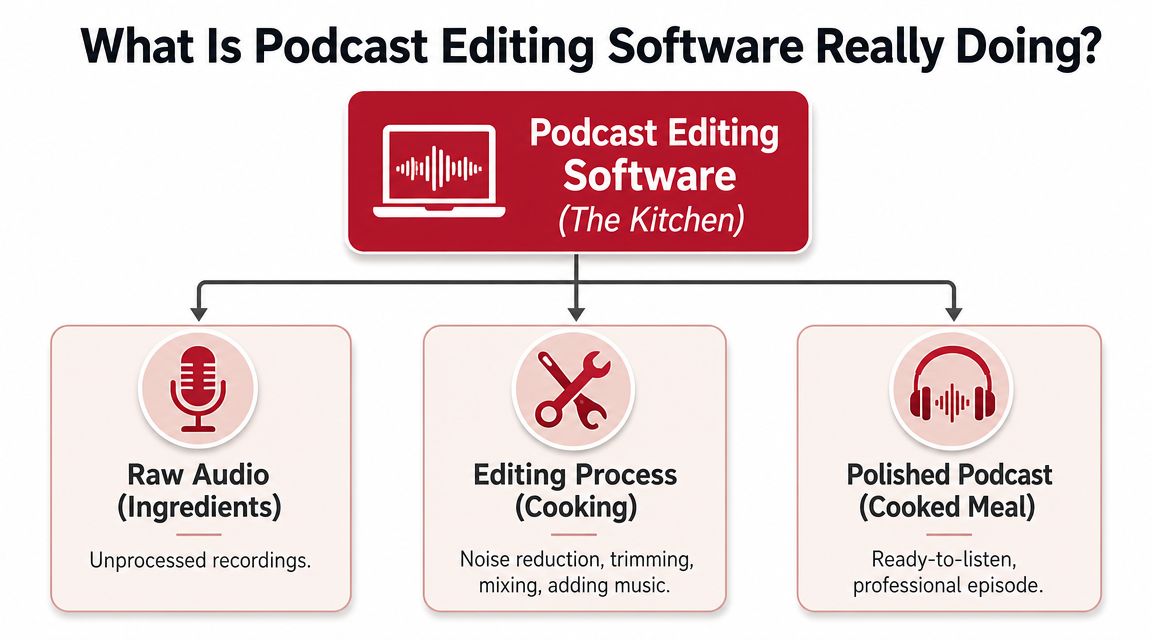
Podcast editing software is the production kitchen. The recording session delivers raw ingredients. The editor turns them into something people can enjoy.
The core production job
At its most basic level, podcast editing software takes a rough recording and turns it into a finished delivery file. The core job is to trim unwanted sections, normalize levels, remove background noise, and export an MP3 for hosting, as outlined by Transistor's guide to podcast editing software.
That sounds simple until a real episode hits the timeline. A host interrupts a guest. One mic is louder than the other. A remote interview has keyboard noise. The intro music needs a clean fade. The final export has to sound consistent from the first sentence to the sign-off.
Those are not cosmetic details. They're the difference between a show that feels trustworthy and one that feels homemade in the wrong way.
Why the editing stage changes the listener experience
Editing shapes three things listeners notice immediately, even if they can't name them:
- Clarity: Can the audience understand every speaker without strain?
- Pacing: Do the cuts keep the conversation moving without sounding robotic?
- Consistency: Does the episode hold a stable volume and tone from start to finish?
A basic tool can handle some of this. A stronger tool can make it faster and more repeatable. That's its core value.
Editing isn't just cleanup. It's where intelligibility, pacing, and loudness consistency are built into the episode before anyone hears it.
A useful way to think about software choice is this:
- A full DAW is like a professional kitchen. It gives the producer full control over each ingredient and each step.
- A convenient editor is like a meal-kit service. It reduces setup, simplifies decisions, and gets to a finished result faster.
Both can produce a good show. The difference is how much control the producer wants, and how much time the workflow can afford.
The Two Main Types of Editing Software
A new podcast usually starts with the same question: what should we edit in? The better question is what kind of production process you need a month from now, when you are cutting episodes, pulling clips for social, cleaning up transcript mistakes, and trying to publish on time without the show sounding rushed.
At a practical level, podcast editing tools fall into two groups. There are digital audio workstations, or DAWs, built for detailed manual control. Then there are simplified editors built to reduce production time with automation, text-based editing, and publishing-friendly workflows.
The choice affects more than the edit itself. It shapes how easily your team can turn one recording into an episode, a transcript, short clips, and video assets without breaking consistency or losing your brand voice.
Digital audio workstations for full control
DAWs include tools like Adobe Audition and REAPER. They give producers precise control over tracks, processing, routing, repair, and mix decisions.
That matters when the raw material is messy.
If a host and guest were recorded on separate mics, one speaker has room echo, the other clips occasionally, and the episode needs music, ads, and clean transitions, a DAW gives you the control to fix those problems properly instead of accepting the defaults. That is why DAWs remain the safer choice for remote interviews, narrative shows, client work, and any production where the listening experience carries the brand.
A DAW usually fits teams that need:
- Multitrack control: adjust host, guest, music, and sound design separately
- Detailed repair: handle clicks, plosives, bleed, and uneven tone with more precision
- Repeatable sessions: use templates for recurring intros, ad breaks, and export settings
- Mix decisions by ear: keep the final episode polished without relying entirely on automation
The trade-off is time. A DAW asks for setup, judgment, and some engineering discipline. In return, it gives you better odds of making difficult recordings sound intentional.
Simplified editors for speed
Simplified editors are built for creators who care about consistency but do not want every episode to become a post-production project. Many use transcript-based editing, automatic leveling, filler-word removal, and quick export options for multiple platforms.
This category works well when publishing speed is the primary constraint. A consultant with a weekly interview show, a small marketing team producing thought leadership, or a founder building authority content often needs a tool that helps them move from recording to publish with fewer decisions. That is especially true for teams learning how to start a video podcast and trying to keep audio, video, and clips in one manageable process.
These tools also fit repurposing-heavy workflows. If the team edits by reading first, highlights quotes for social, and wants a transcript to feed blogs or newsletters, the software has to support more than waveform editing. It has to support content production. Understanding how AI transcription works helps here, because transcript-driven editing only saves time when the text is accurate enough to trust.
The trade-off is control. AI can remove pauses, tighten pacing, and clean up a pass quickly, but it can also flatten the rhythm that makes a host sound credible and human. For branded shows, that matters. Fast output is useful. Generic output is expensive.
DAW vs. Simplified Editor at a Glance
| Factor | Digital Audio Workstation (DAW) | Simplified Editor |
|---|---|---|
| Learning curve | Higher. More setup and more decisions | Lower. Faster to start producing |
| Editing control | Detailed manual control | Focused controls with more automation |
| Best for | Producers, agencies, complex or imperfect recordings | Solo hosts, lean teams, fast publishing schedules |
| Audio repair | Better for difficult cleanup work | Good for common issues |
| Workflow speed | Slower upfront, efficient once the workflow is built | Fast from the first episode |
| Repurposing support | Depends on the tool | Often stronger for transcript, clips, and multi-platform output |
The right choice depends on where your bottleneck is.
If your recordings are inconsistent and your standard for polish is high, use a DAW. If your recordings are clean and your business depends on publishing reliably across channels, a simplified editor may be the better tool. Many teams end up using both. They cut fast with AI, then make final judgment calls by hand so the show still sounds like their brand, not just processed audio.
Key Editing Features That Actually Matter
A long feature list is not the decision. The decision is where your team loses time, where quality slips, and which tool fixes that problem without making the rest of the workflow harder.
Good software should help from the first cut through final export. If the same episode also needs a transcript, short clips, captions, and social assets, the right feature set looks different than it does for a producer delivering audio only.
Features tied to real production problems
Start with multitrack editing. If the host is clean but the guest came through a laptop mic with room noise, separate tracks let you fix one voice without damaging the other. For interview shows, that is often the difference between "usable" and "professional."
Noise reduction and repair matter for a different reason. They protect good conversations from bad recording conditions. HVAC rumble, hiss, clipping, plosives, and remote-call artifacts can all pull attention away from the content. Strong cleanup tools save episodes that would otherwise need heavy re-recording or awkward edits.
Leveling and loudness control save review time. Listeners notice uneven volume faster than they notice almost any other technical issue. If your host, guest, intro, and ad read all land at different levels, the show feels patched together.
Templates, presets, and batch exports become more important once the podcast feeds other channels. A weekly production team may need the full episode, a trailer cut, quote clips, and platform-specific exports from the same session. Repeating those steps by hand every week is where time disappears.
Transcript-based editing helps when the approval process happens in words, not waveforms. Marketing leads, founders, and clients often want to review copy, highlight pull quotes, and identify clip-worthy moments from text. Teams evaluating that option should understand how AI transcription works, because text-based editing only saves time when the transcript is accurate enough to trust.
One caution matters here. Fast AI cleanup can remove pauses, breaths, and small imperfections that make a host sound credible. If your podcast supports a brand, those choices affect more than audio quality. They affect how real the speaker feels.
The best feature is the one that removes a recurring bottleneck without sanding off the voice of the show.
What changes across tool tiers
Tool tiers are really about trade-offs.
Audacity handles core editing well when the recording is decent and the budget is tight. You can cut interviews, remove obvious mistakes, and assemble complete episodes without paying for a subscription. The limitation shows up when audio problems pile on and you need faster repair, tighter mixing, or a cleaner handoff between people.
Adobe Audition gives producers more control over dialogue cleanup, multitrack mixing, and problem-solving on imperfect recordings. It takes longer to learn, but that extra control pays off when quality standards are high or episodes vary from session to session.
Auphonic fits a different use case. It is useful when a team wants consistent leveling and automated enhancement with minimal manual work. The trade-off is judgment. Automation can get you to "clean enough" quickly, but branded shows often still need a person to decide what should stay natural.
That is why software choice should match the full production path, not just the edit window. A solo host may value speed and text-based editing. A producer handling premium interviews may need repair depth and precise control. A content team repurposing every episode into clips, newsletters, and social posts needs an editing system that supports a repeatable podcast audio editing workflow across more than one deliverable.
Software can speed up production. It cannot make editorial decisions for you.
Sample Workflows for Different Podcasters
The right software becomes obvious when the workflow is concrete instead of theoretical.
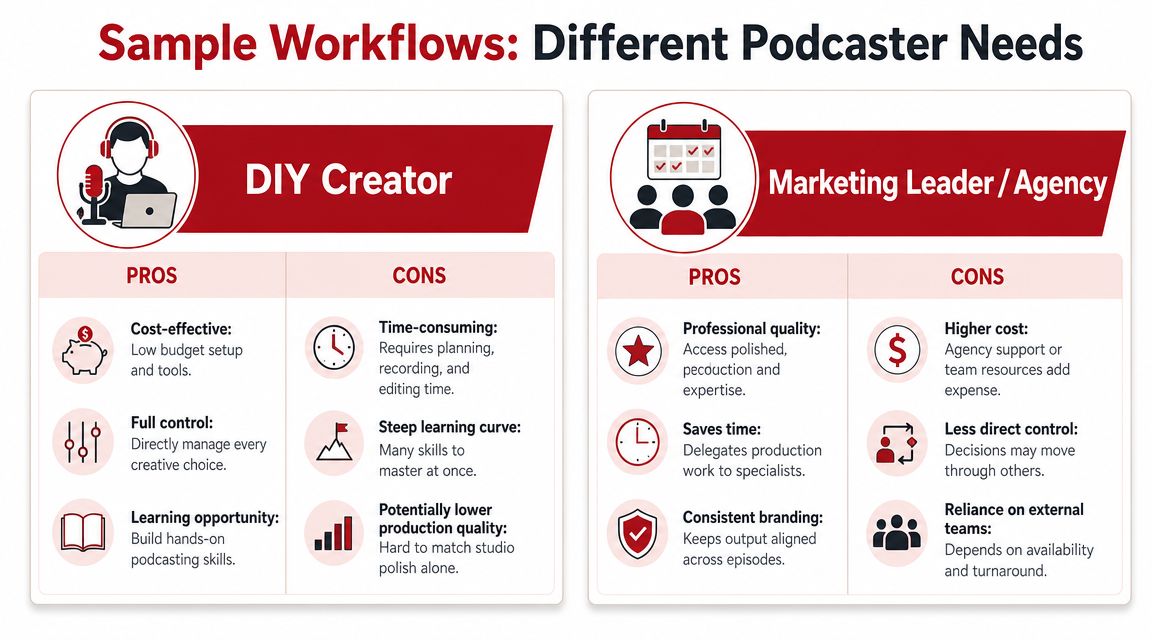
Sarah the solo consultant
Sarah records one interview a week. She uses the podcast to build authority, stay visible with clients, and turn conversations into content. She doesn't want to spend nights learning advanced routing, plugin chains, or restoration tools.
Her ideal setup is usually a simplified editor with clean trimming, simple leveling, transcript support, and export options that make repurposing easier. She still needs to review the final product carefully, because AI cleanup can over-tighten the delivery and remove the pauses that make her sound thoughtful instead of scripted.
That caution matters. Research cited by Fame reports that 56% of young listeners say podcast hosts have a connection to listeners that traditional media personalities do not, and 48% feel podcasts have more authenticity, which is why aggressive automation can work against the brand if it makes the host sound over-processed, according to Fame's analysis of AI editing and authenticity.
Leave in some breathing room. A polished podcast should sound intentional, not machine-sanded.
The marketing team at a B2B firm
A B2B team has a different problem. The show isn't just an episode. It's one asset feeding multiple channels.
The team records remote interviews with internal leaders and external guests. Someone needs clean audio. Someone else needs a video version. Marketing wants clips. Content wants transcript pull-quotes. The production process needs standardization, especially when the team is coordinating remote podcast recording across multiple speakers.
This workflow usually points toward one of two setups:
- A stronger in-house stack with more advanced editing and repurposing support
- A hybrid workflow where software handles intake and rough prep, then a producer finalizes assets
The key difference from Sarah's setup is quality control. A B2B brand can use AI to speed up cleanup, but it still needs human review for tone, pacing, and message accuracy. If the editor removes every pause, smooths every breath, and hard-cuts every sentence, the result may sound efficient while subtly damaging trust.
How to Choose the Right Software for Your Goals
The fastest way to narrow podcast editing software options is to stop asking which tool is best and start asking which constraints are real.
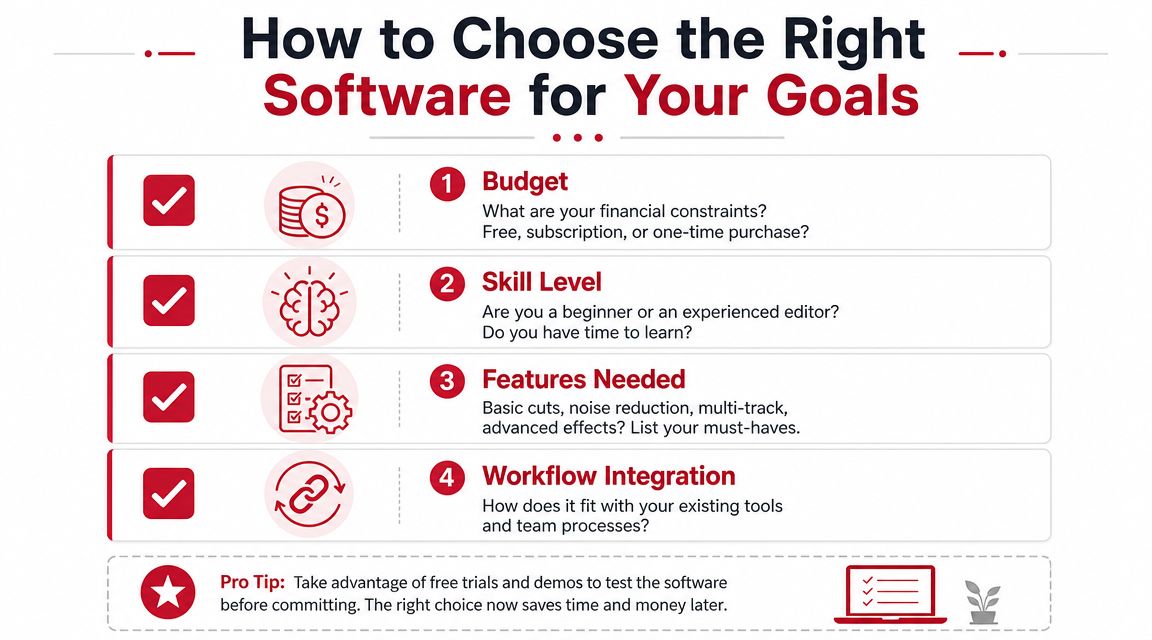
Four questions that narrow the field fast
A simple decision framework usually surfaces the right category quickly.
Budget
Free and lower-cost tools can absolutely work when recordings are clean and the producer can accept some manual work. Higher-cost tools usually become worth it when they remove repeated labor or reduce mistakes.Skill level
Some teams enjoy mastering a DAW. Others won't. If the interface feels intimidating enough to delay publishing, the tool is already too expensive in time.Episode volume and time pressure
Weekly publishing with clips and repurposing needs a faster system than occasional long-form interviews. A slower editor can still be right if the team values control and has room for it.Collaboration needs
A one-person podcast has different requirements than a show involving hosts, editors, marketers, and approval steps.
A broader survey of tested podcast creation tools can help during this stage, especially for teams comparing all-in-one production environments against more traditional editing stacks.
A short demo can also reveal more than a feature list. This walkthrough is useful for thinking about software choices in a broader production context:
Choose for the content waterfall, not just the episode
This is the question many buyers miss. Does the software only finish audio, or does it help the team turn one recording into multiple publishable assets?
Modern podcasting increasingly requires video edits, social shorts, and transcript-based content from one episode, and the stronger decision is often the one that supports that content waterfall rather than treating editing as an isolated audio task, as discussed in Adobe's Podcast Edit Premium report coverage on multi-format publishing.
That changes the buying logic.
A software choice is stronger when it supports:
- Long-form episode delivery
- Short-form cutdowns
- Transcript extraction
- Video-friendly outputs
- Repeatable handoffs across the team
If those needs are likely to arrive soon, it's smarter to buy for the next stage of the workflow now instead of rebuilding the process later.
When Your Best Software Is a Service
A common turning point comes after a few solid episodes. Recording is under control. The problem is everything after recording. Files pile up, approvals drag, clips go out late, and the host ends up editing instead of preparing the next conversation.

The signs that DIY has stopped making sense
DIY editing still works for a solo host with a simple format, a light release schedule, and time to learn the tools. It starts breaking down when post-production takes time away from sales, client delivery, leadership, or content planning.
The first warning sign is usually delay. The episode gets recorded on time, but publishing slips because editing, review, and export happen in fragments.
Other signs show up quickly:
- Release dates keep moving: The team records consistently but cannot finish consistently.
- Too many handoffs create rework: Audio edits, transcripts, shorts, and approvals live in separate tools and need repeated fixes.
- Episode quality varies: The final result depends on who had time to handle cleanup that week.
- The host is stuck doing low-value work: Time goes into cuts, fades, and file prep instead of guest prep and message clarity.
For teams still comparing the DIY path, this roundup of best free podcast editing software 2026 helps set realistic expectations around what free tools can handle before workflow strain starts costing more than the software saves.
What outsourcing changes
A service changes more than the edit. It changes ownership of the workflow.
That matters because the core job is rarely just noise reduction and leveling. The team also needs episode assembly, show notes, publishing assets, review management, and often short-form content for YouTube, LinkedIn, or Reels. AI can speed up parts of that process, and good teams use it where it saves time. Brand voice still needs a human pass. Timing, tone, clip selection, and what should be left in or cut out affect how the show feels to listeners.
This is the trade-off buyers need to judge. Software gives speed and control. A service gives consistency, judgment, and time back.
For consultants, founders, nonprofits, and marketing teams, that trade often makes sense once the podcast feeds a broader content engine. Get Up Productions is one example of a production service that handles editing, mastering, YouTube-ready delivery, and repurposing as part of that workflow.
The biggest gain is attention returned to the right person. The host can focus on stronger interviews, clearer points of view, and content that supports the business, while production moves through a repeatable process in the background.