
A raw interview is sitting on the desktop. One guest drifted off mic. Another joined from a noisy room. There are long pauses, throat clears, cross-talk, and a rough ending because everyone thought the recording had stopped. That's the moment most new podcasters realize recording is only half the job.
The next decision usually sounds simple: find the best podcast editing software and clean it up. In practice, that choice has less to do with features than with workflow. Some people need full manual control. Others need to turn a transcript into a finished episode fast. Some teams need remote recording and review in one place. Others should stop editing themselves and hand the work off.
A useful buying decision starts with one question. Is the goal to save cash, save time, or raise production quality without burning internal bandwidth? That answer will narrow the field faster than any feature grid. It also affects adjacent choices, like whether the show needs custom intro music, licensed tracks, or simple beds from a library. For teams still figuring that part out, this guide to podcast background music choices helps frame what belongs in the final mix.
Transcript-based workflows matter here too. A lot of podcasters now start their edit by reviewing text first, especially for interviews and thought-leadership shows. If that sounds closer to the way a team already works, these voice-to-text software options are worth reviewing alongside editing tools, because transcription quality often shapes how quickly an episode moves from rough capture to publishable draft.
Table of Contents
- The Three Kinds of Podcast Editing Software
- How to Choose Your Editing Software
- Top Podcast Editing Software Compared
- Matching the Right Tool to Your Podcast Mission
- When to Stop DIY Editing and Hire an Agency
- Frequently Asked Questions About Podcast Editing
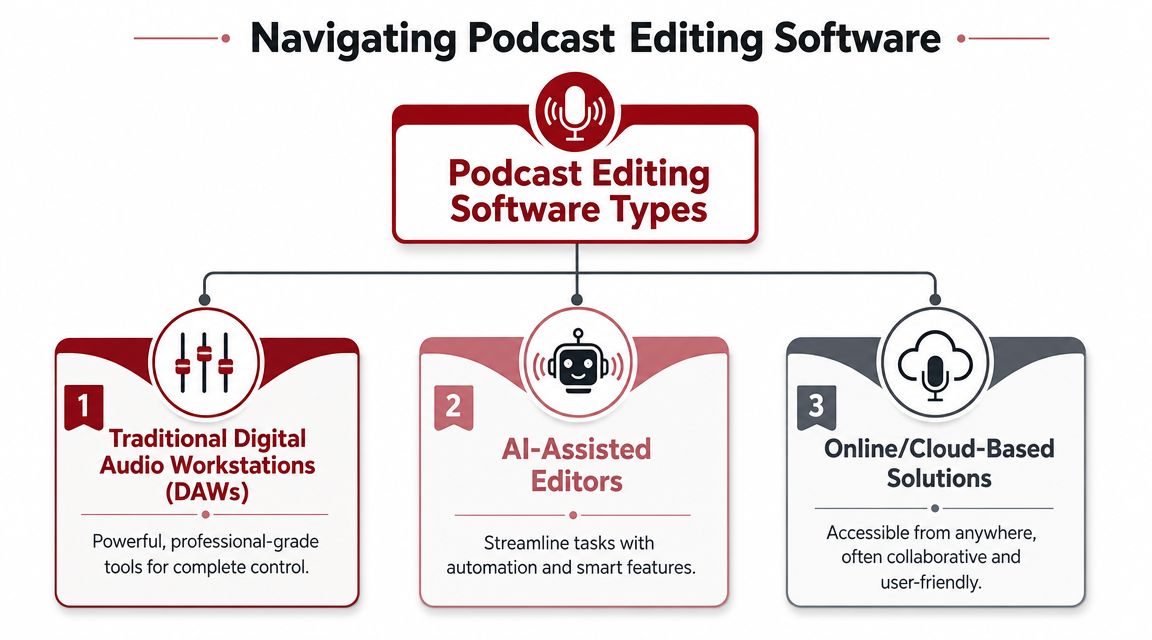
The Three Kinds of Podcast Editing Software
A new podcaster usually asks for the best editing app. The better question is which workflow fits the show, the team, and the budget.
That distinction matters because software is not just a creative choice. It is a business decision about where the hours go. Some tools save cash and cost time. Others reduce editing hours but raise the monthly bill. And at a certain point, the right move is to stop refining your setup and hand the production over to a podcast audio editing service.
Traditional DAWs
Traditional digital audio workstations are built for manual editing. Tools like Audacity sit in this category. They give the editor direct access to the waveform, which is useful for precise cuts, noise cleanup, level riding, fades, and detailed mix decisions.
This setup fits creators who have more time than money, or producers who care about exact control.
Typical fit:
- Budget-conscious solo hosts who can handle the editing workload themselves
- Experienced editors who want to place every cut intentionally
- Audio-first shows with simple production needs and no approval chain
The trade-off is speed. A DAW is dependable, but every improvement usually requires another manual step. That can be a fair trade for a weekly interview show with a tight budget. It becomes expensive fast if the host should be spending those same hours on sales, guests, sponsors, or client delivery.
All-in-one production platforms
The second category combines several jobs in one system. Recording, transcription, editing, and file management often live in the same workspace. Descript and Riverside are common examples.
These tools are designed for repeatable production. A host records, the assets stay organized, and the team can work from one environment instead of passing files between platforms. For a founder-led show or a marketing team producing content every week, that reduction in handoffs often matters more than advanced editing depth.
Common strengths:
- Transcript-based editing
- Remote guest recording
- Shared access for teams
- Faster turnaround for standard episode formats
The limitation shows up when the production gets more demanding. Detailed repair, layered sound design, and fine mix control are still easier in a dedicated editor. All-in-one platforms are strongest when consistency and speed matter more than engineering precision.
AI-assisted editors and enhancers
The third category focuses on automation. AI-assisted tools help with transcript edits, voice cleanup, filler-word removal, leveling, and fast spoken-word polish. Adobe Podcast fits here, and some overlap with the all-in-one category is normal because several platforms now blend both approaches.
For many podcasters, this is the fastest route from raw recording to publishable episode. That speed is valuable if the content is strong, the release schedule is tight, and the team does not need to sculpt every second by hand.
This category is strongest when:
- The show is interview-led and dialogue-heavy
- Publishing speed affects business momentum
- The goal is clear, clean speech rather than a custom-produced sound
It is weaker when the source audio is poor. AI can improve echo, noise, and uneven tone, but it cannot fully fix bad mic technique, people talking over each other, or a guest recording in a loud kitchen.
One more practical note. If the show also needs intro music, stingers, or simple branded audio elements, some teams pair their editor with software for budget-friendly music creation. That can keep early production costs down, although custom music still gives a show a more distinctive identity.
The short version is simple. DAWs reward time and skill. All-in-one platforms reward repeatable workflows. AI editors reward speed. The right category depends less on features and more on what your production process can realistically support every week.
How to Choose Your Editing Software
A software choice usually goes wrong in the same moment. The host records a solid episode, opens the editor, and realizes the tool either takes too long to learn or cannot handle the cleanup the episode needs. At that point, the question is no longer features. It is whether the workflow protects your time or drains it.
That is the buying decision. Podcast editing software is a business calculation before it is a tech purchase. If the show supports lead generation, client trust, donor confidence, or weekly audience growth, editing time has a cost. Saving money on software only works if the team can still publish on schedule and maintain quality.
Start with the bottleneck
Choose software based on the step that currently slows production.
If editing takes too long, a transcript-first tool may be the right fit. If the show sounds uneven, choose software with better manual control. If multiple people need to review and approve cuts, collaboration matters more than advanced effects. If the team records video and slices social clips from each episode, the editor has to support that wider content workflow.
These questions usually make the answer clearer:
- How many hours can the team realistically spend on each episode?
- Does the show need audio only, or audio and video?
- Will one person edit, or will producers, marketers, and hosts all touch the file?
- Is the goal polished brand authority, fast publishing, or both?
- Will the team stay consistent enough to justify learning a more manual tool?
A solo host with one weekly interview often needs speed and simplicity. A branded show tied to revenue usually needs a process that stays reliable as the workload grows.
Cheap software becomes expensive when it pulls the host away from sales calls, client delivery, fundraising, or content strategy.
Evaluate audio cleanup capabilities realistically
Software demos make cleanup look easy. Real episodes are less forgiving.
Check how the tool handles the problems your show has:
- Room noise and echo from remote guests
- Pacing control for long pauses, filler words, and awkward gaps
- Level balancing between different speakers
- Manual correction when automation cuts the wrong phrase or creates unnatural timing
- Music and track control if the show uses intros, outros, or light scoring
Many buyers misjudge the trade-off. AI cleanup is fast when the recording is already decent. It is less reliable when guests interrupt each other, pronunciations confuse the transcript, or the source audio is rough. In those cases, a simpler manual editor can produce a better final result if someone on the team has the patience to use it well.
Match the editor to the full production workflow
Editing software should fit the whole chain from recording to review to publishing.
A few examples make that practical:
- If the team adds intros, outros, or simple music beds, basic multitrack control matters. Teams testing that approach may also want software for budget-friendly music creation before paying for custom composition.
- If episodes need stakeholder approval, shared comments and review access matter more than niche audio tools.
- If the show is part of a larger content engine, transcript accuracy, clip export, and repurposing speed can matter as much as the final mix.
- If polished finishing keeps slipping, it may be smarter to keep recording and approvals in-house and hand off the edit to a specialist through podcast audio editing support.
That last point matters more than many teams expect. The right answer is not always better software. Sometimes the right answer is stopping the in-house process before it starts consuming senior team time.
Score the workflow, not the brand
A short scorecard prevents expensive guesswork. Rate each option on the criteria that affect weekly delivery:
- Editing speed
- Cleanup control
- Ease of training
- Review and collaboration
- Recording and video support
- Fit for repeatable publishing
Use your actual show to test it. Import a rough interview, add your standard intro and outro, make a few content cuts, and export the final file. A trial is only useful if it reflects the work you will really do every week.
Watch for false efficiency
Some tools save time in a demo and waste time in production.
That usually happens for three reasons:
- The AI draft needs too much correction. Names, industry terms, and speaker changes often create cleanup work after the first pass.
- The software is fast for trimming but weak for finishing. You save time early, then lose it when polishing music, pacing, or repairs.
- The workflow is fragmented. Recording in one app, editing in another, approving in a third, and publishing somewhere else creates handoff friction.
The best choice removes the costliest bottleneck in the current process. For some shows, that means simpler software. For others, it means a stronger editor. For growing brands, it can mean keeping control of the creative direction while handing off the labor-intensive polish.
Top Podcast Editing Software Compared
A tool comparison matters once the weekly workload becomes real. An interview runs long, a guest sends a noisy track, the host wants approval edits by noon, and someone still has to export clips for social. At that point, software stops being a feature decision and becomes a cost decision. Are you saving enough production time to justify the subscription, or are you adding labor that would be cheaper to hand off?
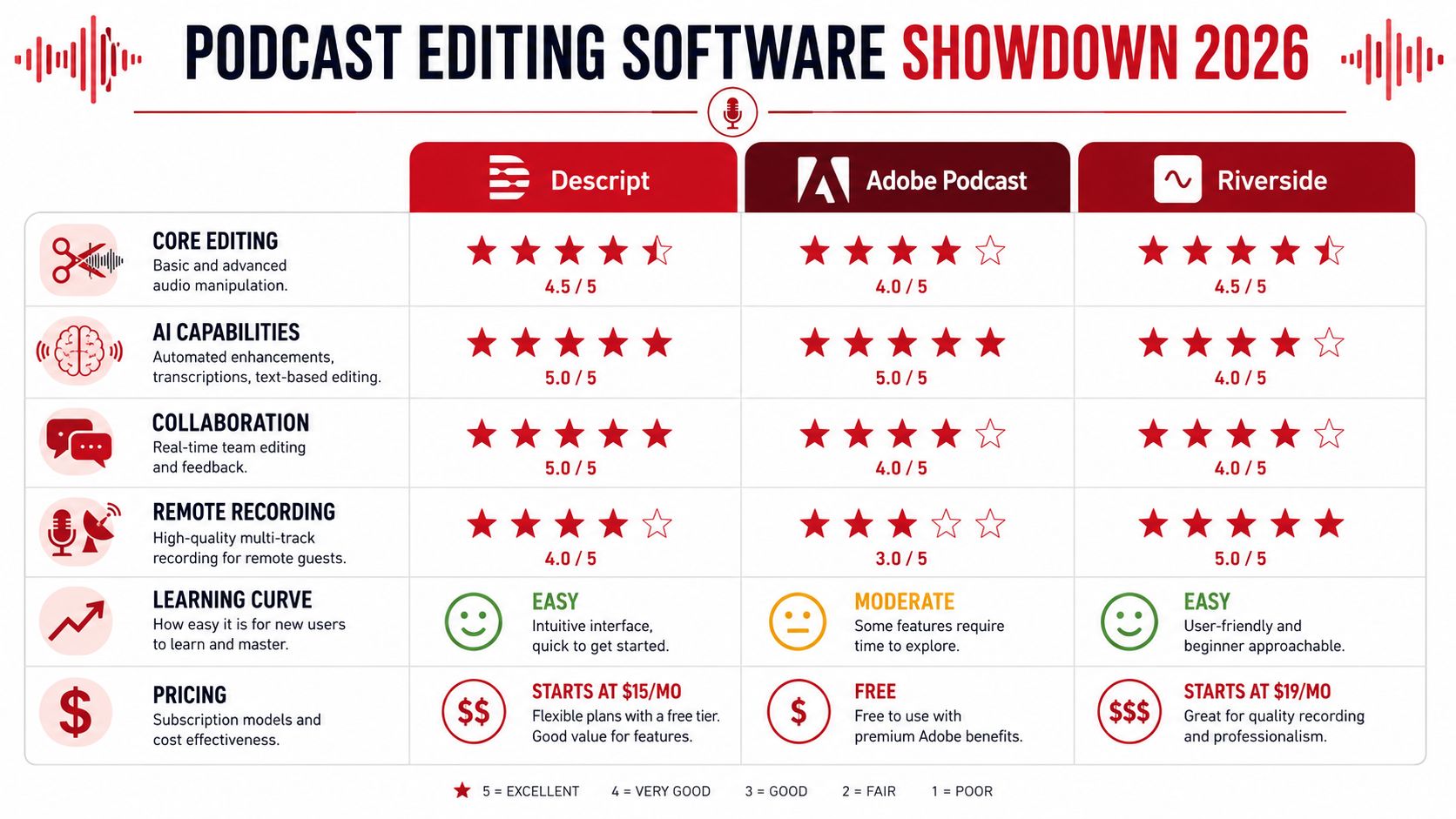
Podcast Software at a Glance
| Tool | Best For | Key Strength | Pricing Model |
|---|---|---|---|
| Descript | Transcript-led editing for content teams and solo hosts | Fast text-based editing and repurposing in one workspace | Free tier and paid plans |
| Adobe Podcast | Quick spoken-word cleanup | AI speech enhancement and text editing | Free tier and premium plan |
| Riverside | Remote interview production | Recording, guest capture, and light editing in one platform | Subscription plan |
| Audacity | Manual editing on a tight budget | Full hands-on control without subscription cost | Free |
The practical question is simple. Which tool removes the most expensive bottleneck in your current process?
Descript
Descript fits teams that review content by reading, not by listening through a timeline. That makes it a strong option for interview shows, founder-led content, and marketing teams that need transcripts, clips, and episode edits from the same session.
Best use cases:
- Interview podcasts with frequent verbal cleanup
- Thought-leadership shows that also need clips
- Teams that want one environment for editing, transcripts, and review
What works:
- Editing by transcript is easier to train across a team
- Verbal cleanup is faster than manual waveform editing
- Review is easier when producers, hosts, and marketers can work from the same text
What doesn't:
- Detailed mix work is still better in a traditional audio editor
- Editors used to precise DAW control may find it limiting
- Sound design heavy shows can outgrow it fast
Descript saves time when the primary job is shaping spoken content, not engineering a polished mix from scratch.
Adobe Podcast
Adobe Podcast is built for speed. If the show is mostly voice, the host needs fast cleanup, and no one wants to spend hours learning a traditional editor, it can shorten the path from raw recording to publishable draft. Adobe explains the workflow and plan limits in this Adobe Podcast pricing and workflow overview on YouTube.
That makes Adobe Podcast a sensible fit for:
- Coaches and consultants
- Founders recording concise solo episodes
- Teams that need a quick first-pass edit before human review
What works:
- Speech enhancement can improve weak recordings quickly
- Text-based editing lowers the training burden
- The cost is easier to justify for lighter production schedules
What doesn't:
- Fine control is limited compared with a full editor
- Longer sessions can hit plan limits quickly
- Multi-speaker timing problems still need manual judgment
Teams producing video should also check Direct AI's professional video software recommendations. Audio and video often split into separate workflows at first, then merge once the show starts publishing across YouTube, LinkedIn, and short-form channels.
This quick walkthrough gives a visual sense of the category and how buyers often compare it:
Riverside
Riverside is usually a recording workflow first and an editing tool second. That distinction matters. If your main production risk is getting clean remote audio from guests who are not technical, Riverside solves a different problem than Descript or Audacity.
Its fit is strongest for:
- Remote interviews
- Marketing teams running recurring guest episodes
- Organizations that need host, guest, and producer coordination
What works:
- Recording and basic production stay in one platform
- Guest management is easier to standardize
- Remote capture is simpler for repeatable team workflows
What doesn't:
- Advanced post-production still feels limited
- Heavy polish usually requires a second tool
- Editing depth is not the reason to buy it
Riverside makes financial sense when bad remote recordings and messy guest logistics cost more time than the subscription itself.
Audacity
Audacity is still the practical choice for producers who would rather trade time for money. It does not reduce editing labor, but it gives full manual control without a recurring software bill.
Best fit:
- Independent creators
- Nonprofits
- Anyone willing to learn hands-on editing
What works:
- Full manual control over core cleanup
- No subscription pressure
- Cross-platform access and a low barrier to entry
What doesn't:
- Every edit still takes human time
- Collaboration is limited
- Transcript-first teams will find it slower than newer tools
For a simple spoken-word show, Audacity can produce solid results. For a team publishing weekly and reviewing across marketing, leadership, and production, the hidden cost is time. That is usually the point where software alone stops solving the workflow problem.
Matching the Right Tool to Your Podcast Mission
A founder records a strong interview, hands the file to a teammate, and the episode still misses its publish date. In my experience, that usually points to a workflow mismatch, not a software failure. The right editing tool depends on what the podcast is supposed to do for the business and how much internal time the team can afford to spend on production.
For the Solo Thought Leader Building a Personal Brand
A solo expert usually needs a fast path from recording to publish. Transcript-led tools such as Descript, or AI-assisted cleanup in Adobe Podcast, often fit that goal better than a traditional multitrack editor.
The trade-off is straightforward. These tools save time, but they can flatten nuance if the host relies on automation for every edit. For interview shows, solo commentary, and light polish, that compromise is often acceptable because core business value sits in consistency, point of view, and audience trust.
Good choice signals:
- The host wants to review and revise by text
- Episodes are conversational rather than heavily produced
- Publishing regularly matters more than detailed sound design
For the Marketing Team Launching a B2B Show
A B2B team needs a system that survives handoffs. Recording, guest coordination, approvals, clips, and brand review all compete for attention, so the best tool is usually the one that reduces operational drag.
Riverside often fits that job on the capture side. It keeps remote interviews more organized and makes guest management easier to repeat across episodes. The limitation is that it still may not cover the finishing work a branded show needs once marketing expects clean pacing, repurposed assets, and dependable release timing.
That is why some teams split the workflow. They keep scheduling and recording in-house, then hand off finishing and repurposing to a partner that handles the production load and related podcast marketing services. That model costs more than pure DIY, but it protects the team's calendar and usually produces a more consistent final product.
The right tool for a team is the one that protects cadence and reduces internal dependency on one overloaded person.
For the Nonprofit With a Mission and a Budget
For this use case, Audacity still has a strong place. It is free, flexible, and capable of producing a clean spoken-word episode if one staff member or volunteer is willing to learn a repeatable editing process.
That trade-off matters. Nonprofits and community organizations often have more patience than cash, so a manual editor can be the right financial decision even when it takes longer. The software does not remove labor. It avoids adding subscription costs while preserving control over the basics.
Audacity is a sensible fit when:
- Budget discipline matters more than editing speed
- One team member can own a simple manual workflow
- The show format is dialogue-focused and production-light
It becomes a weaker fit when the organization needs frequent approvals, fast clip creation, or polished video alongside audio. At that point, the software decision starts turning into a staffing decision.
When to Stop DIY Editing and Hire an Agency
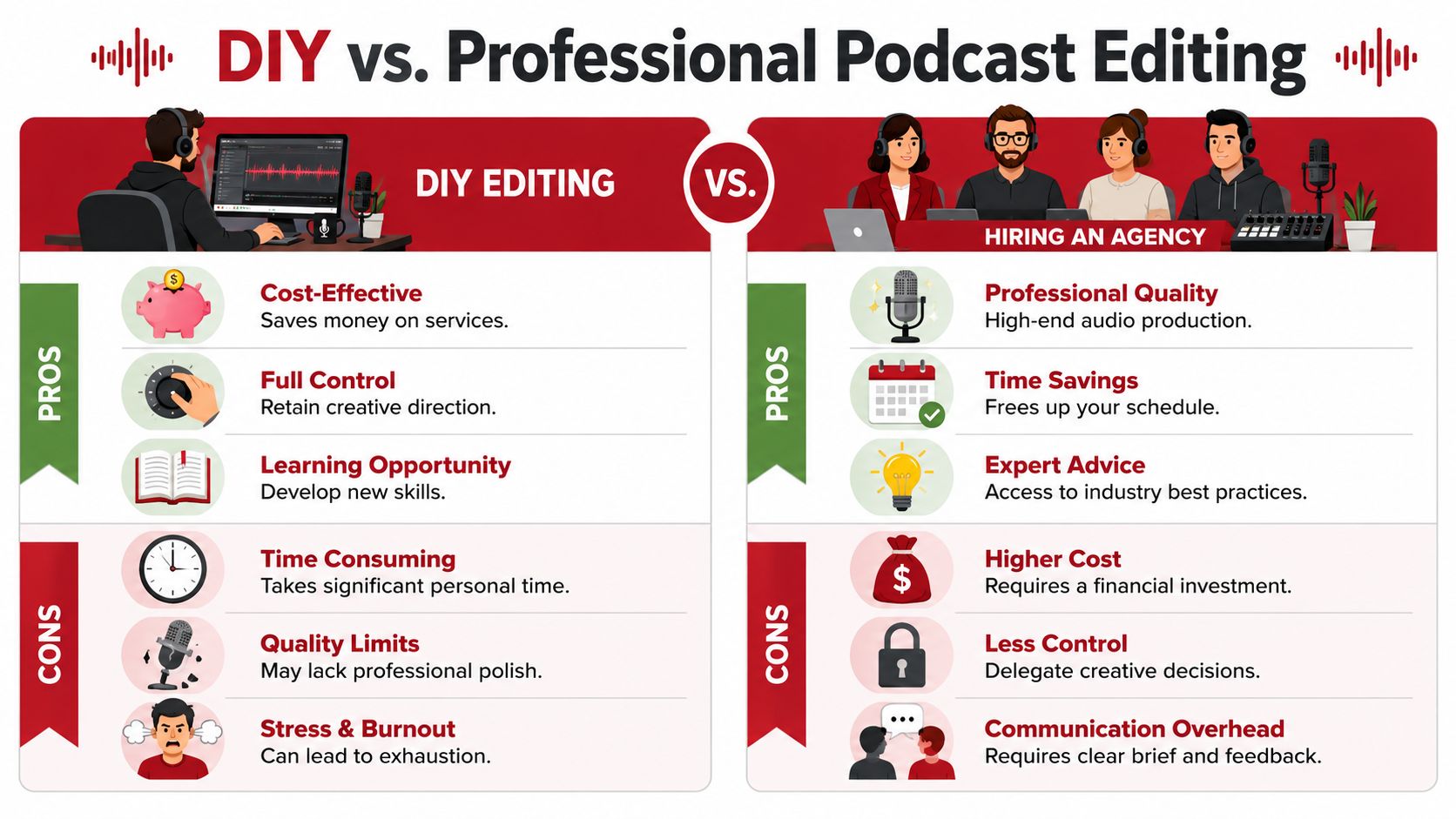
DIY editing makes sense for a while. It teaches the team what clean pacing sounds like, what guests do that creates problems, and where recording discipline matters most. But there's a point where software stops being a solution and starts becoming another responsibility.
The tipping points are operational
A team should consider handing off post-production when the edit is regularly delaying publishing, when on-brand finishing depends on one overextended person, or when the show needs more than cleanup. Once episodes require intro/outro shaping, pacing judgment, music handling, video alignment, show notes, short clips, and distribution assets, the software question changes.
At that stage, the business is no longer choosing an editor. It's choosing whether internal attention belongs on production or on the work the podcast is supposed to support.
Common signals:
- Episodes sit unfinished because editing keeps getting pushed
- The host's time is more valuable elsewhere
- The show needs consistent polish across audio and video
- Repurposing has become part of the strategy, not an extra
Quality has a ceiling when time is thin
Most software can help a decent recording sound cleaner. Software alone won't build cinematic pacing, selective emphasis, branded consistency, or a repurposing engine around each episode.
That's where an outside production partner becomes practical rather than luxurious. One option is Get Up Productions' podcast marketing services, which connect editing to broader packaging and distribution work instead of treating the episode file as the final product.
Hiring support isn't an admission that the team can't edit. It's recognition that authority-building content needs a reliable production system.
The strongest agency relationships also solve the hidden problem inside DIY workflows. They remove context switching. The host records, reviews, and publishes. The technical heavy lifting happens elsewhere.
Frequently Asked Questions About Podcast Editing
What is the difference between editing, mixing, and mastering
Editing removes mistakes, tightens pacing, trims silences, and shapes the structure of the episode. Mixing balances voices, music, and other elements so they sit together clearly. Mastering is the final polish that prepares the episode for distribution with a consistent, finished sound.
A lot of beginners use “editing” to mean all three. That's normal. But they're separate jobs.
How long should it take to edit one hour of audio
There isn't one fixed answer. The time depends on how clean the recording is, how many speakers are involved, whether video is included, and how polished the final product needs to be.
A clean solo recording can move quickly. A multi-guest conversation with interruptions, noise, and revision rounds can take much longer than expected.
Can video editing software handle a podcast
Sometimes, yes. If the show is a video-first podcast and the editor already works comfortably in a video timeline, one tool may be enough for a basic workflow.
The problem comes when audio quality needs detailed attention. Video editors can cut a podcast, but they don't always offer the cleanest spoken-word workflow for repair and finishing.
Do expensive plugins matter for podcast sound
Not at the beginning. Good microphone technique, a quiet room, stable guest capture, and disciplined editing matter more than a stack of premium effects.
Most podcasts improve faster from better workflow decisions than from buying more tools.
If the team is spending more time fixing episodes than using the podcast to build authority, generate leads, or grow a message, it may be time to simplify the workflow. Get Up Productions handles recording support, editing, mastering, YouTube-ready production, and multi-platform repurposing so hosts can stay focused on the content only they can create.