

A familiar pattern shows up in almost every stalled content program. The team records a solid podcast episode, posts the full video, cuts one or two clips, then waits for leads that never arrive. Views trickle in. A few subscribers engage. Sales asks whether the show is doing anything useful, and nobody has a clear answer.
The problem usually isn't the camera, the host, or even the topic. It's the missing system between publishing and conversion. Video for lead generation works when one strong piece of pillar content feeds a sequence of assets, landing pages, and calls to action that guide the right viewer toward the next step. That system is the Content Waterfall. One long-form episode becomes the source material for a full-funnel campaign instead of a single post with a short shelf life.
Table of Contents
- Moving Beyond Views to Generate Leads with Video
- Planning Your Pillar Video Content for Conversion
- Producing Authority-Building Pillar Content
- Executing the Content Waterfall Repurposing Method
- Optimizing Every Video Asset for Conversion
- Your Distribution Schedule and KPI Dashboard
Moving Beyond Views to Generate Leads with Video
A lot of teams still treat video like a branding expense. They publish episodes to stay visible, not to produce pipeline. That mindset creates content libraries full of decent material and very little revenue impact.
The shift in the market has already happened. 83% of marketers report that video has helped boost their lead-generation activities, and adding video to outreach emails can increase replies by 26%, while using video in proposals has been shown to increase close rates by up to 41% according to lead generation benchmarks for video performance. Those numbers matter because they move video out of the awareness bucket and into measurable business development.
Why one-off videos underperform
One-off production almost always breaks in the same places:
- No conversion path: The episode ends, but the viewer has nowhere useful to go next.
- No asset plan: A long-form recording gets posted once and then abandoned.
- No sales alignment: Marketing publishes content that sales can't use in outreach, proposals, or follow-up.
- No operating rhythm: Clips go live whenever someone has time, which usually means inconsistently.
A content program without process produces activity, not demand.
Practical rule: If the team can't answer "what should a qualified viewer do after this video?" before publishing, the asset isn't ready.
The Content Waterfall fixes that by turning one strong recording into a controlled sequence. The full episode builds trust. Short clips create discovery. Audiograms and quote graphics extend reach. The blog post captures search intent. The landing page collects interest while the topic is still fresh in the viewer's mind.
What changes when video becomes a system
Advantage isn't about volume; it's about continuity. Every asset points to the same offer, reinforces the same positioning, and reaches people in different formats without forcing the team to create from scratch every day.
Teams that need a broader operational framework alongside this approach can also review REACH insights for lead growth, especially for aligning content distribution with lead capture and follow-up. The key is to stop asking whether a single video "worked" and start asking whether the system repeatedly turns attention into action.
That is the difference between publishing content and building a lead engine.
Planning Your Pillar Video Content for Conversion
Most lead generation problems start before the record button gets pressed. The team chooses a broad topic, invites a guest, records a conversation, and only later asks what the video should lead to. By then, the structure is already working against conversion.

Start with one audience and one problem
A pillar video should target a specific buyer, donor, listener, or stakeholder with a single pressing issue. Not a category. Not an industry at large. One clear person with one clear tension.
A weak topic sounds like this: "marketing trends for growing brands."
A stronger topic sounds like this: "how a midsized B2B team can turn one monthly podcast episode into a consistent flow of sales collateral."
That difference changes everything. It sharpens the examples, the title, the guest selection, the questions, and the CTA.
A simple planning filter helps:
- Who is this episode for? A founder, nonprofit director, consultant, pastor, in-house marketer, or sales lead.
- What problem is pressing enough to earn attention? Slow pipeline, inconsistent posting, weak authority, poor follow-up, unclear messaging.
- What would make this worth watching to the end? A playbook, framework, checklist, walkthrough, or decision guide.
Teams that need help organizing the larger strategy can compare their plan against Zebracat's video marketing strategy guide, especially around matching content formats to business goals.
Choose the next step before the topic title
The CTA isn't the finishing touch. It should shape the episode from the beginning.
If the next step is a booked call, the content needs to expose a problem clearly enough that a conversation feels useful. If the next step is a checklist download, the episode should naturally reference a process the checklist expands on. If the next step is a newsletter signup, the video should promise ongoing insight, not a one-time answer.
That planning discipline is what separates educational content from lead-generating content.
A strong pillar episode doesn't try to close the sale. It earns the next click.
For brands building this around a show, a business video marketing approach tied to podcast content usually works better than treating video, audio, blogs, and social as separate channels.
Build the episode around conversion points
The best pillar videos don't ramble toward a CTA. They plant conversion moments throughout the episode.
A practical structure looks like this:
| Episode segment | What it should do |
|---|---|
| Opening hook | Name the problem in direct language |
| Early value | Show the cost of leaving the problem unsolved |
| Middle section | Deliver the framework or process |
| Proof section | Address objections and implementation friction |
| Close | Offer one clear next step |
Many marketing teams overshoot here by including too many takeaways, audience types, and offers. A tighter plan generates better clips later because the episode has a clear spine.
When the pillar video is built around one audience, one problem, and one action, the waterfall downstream gets much easier to execute.
Producing Authority-Building Pillar Content
Production quality matters, but not in the way many teams assume. Viewers will tolerate a simple set. They won't tolerate muddy audio, flat energy, or a conversation that wanders without delivering insight.
Production quality that actually matters
Three elements carry most of the authority signal in long-form video:
- Clear audio: If voices sound distant, clipped, or echo-heavy, viewers leave fast.
- Consistent lighting: The subject should look intentional, not hidden in shadows or blown out by a window.
- Stable framing: A clean composition tells the viewer this content was made on purpose.
Everything else is secondary. Fancy motion graphics won't rescue weak substance. Expensive lenses won't fix vague talking points. Good production should remove distraction and support trust.
A lot of agencies and internal teams overinvest in polish while underinvesting in prep. That creates attractive content with low repurposing value. The pillar asset needs density. It needs memorable lines, clean explanations, and useful sections that can stand on their own as clips later.
Record for clips, not just the full episode
The strongest pillar recordings are built with edit points in mind. That means the host asks tighter questions, the guest answers in complete thoughts, and the conversation pauses between major ideas so editors can create clean cuts.
Useful prompts include:
- Point-of-view questions: "What's the biggest mistake people make here?"
- Contrast questions: "What's working now that didn't work two years ago?"
- Decision questions: "When should someone choose approach A instead of B?"
- Action questions: "What should they fix first this week?"
These prompts produce segments with sharp beginnings and endings. That's what makes a clip usable on LinkedIn, Instagram Reels, YouTube Shorts, and email.
A quick example of production pacing helps:
Use structure to sound more expert
Authority doesn't come from sounding formal. It comes from making complex things easier to understand.
A structured conversation usually includes these traits:
- Defined topic shifts: The host signals when the discussion moves from problem to process to execution.
- Examples with boundaries: Each example supports one point instead of opening a new tangent.
- Short summaries: A host recap every few minutes gives editors natural chapter points.
- Direct answers first: The guest gives the conclusion, then the explanation.
Field note: If a point can't be clipped into a standalone segment without extra context, it probably wasn't stated clearly enough during recording.
That's why a well-produced pillar episode isn't just a finished asset. It's raw material for a campaign. Teams that understand that create recordings with more strategic value and less editing waste.
Executing the Content Waterfall Repurposing Method
The Content Waterfall works because it removes the pressure to invent new ideas for every platform. One pillar video becomes a source file. The team then extracts the strongest moments, reformats them for platform behavior, and publishes them in sequence.
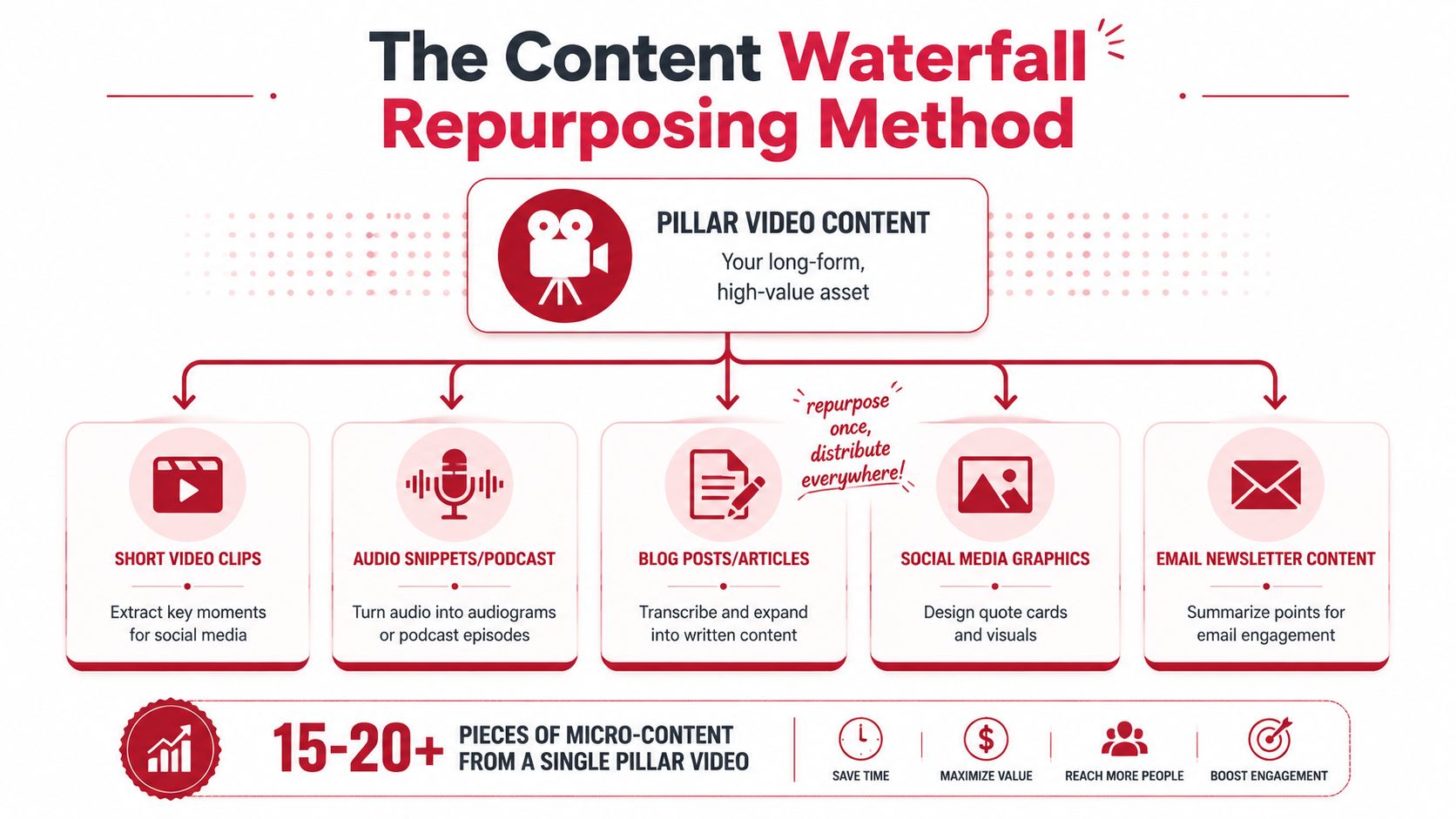
For teams formalizing this process across channels, a dedicated content repurposing strategy for podcasts and video can keep asset creation from turning into a manual scramble.
Start with the master asset
Every waterfall starts with one edited long-form piece. That might be a podcast episode, webinar, interview, roundtable, or solo teaching session. The master asset should already have a clear title, thumbnail, episode description, transcript, and one primary CTA.
From there, the team reviews the timeline and tags segments by function, not just by topic.
Useful tags include:
- Strong hook
- Pain point
- Contrarian insight
- Clear framework
- Objection handling
- CTA moment
Different tags naturally translate into distinct content formats. A contrarian insight often becomes a short vertical clip, while a framework section might turn into a carousel or a blog subsection. Similarly, objection handling can easily transform into a sales-enablement snippet.
Slice by format and platform behavior
Repurposing isn't copy-paste distribution. The same idea needs different packaging depending on how people consume content.
A practical waterfall often includes these asset types:
| Asset type | Best use | What to pull from the pillar video |
|---|---|---|
| Short vertical clips | Discovery and reach | Sharp statements, concise answers, strong hooks |
| Audiograms | Feed engagement where full video isn't native | Audio-driven moments with a clear single idea |
| Quote cards | Authority reinforcement | Strong one-liners and decisive claims |
| Blog post | Search, depth, and CTA support | The full framework expanded in writing |
| Email copy | Nurture and reactivation | Episode summary, one key lesson, one invitation |
The team shouldn't ask, "What can be posted today?" The better question is, "Which excerpt is best suited to the behavior of this channel?"
For example:
- A fast-moving social feed needs a clip that creates immediate curiosity.
- A blog reader needs sequence, context, and examples.
- An email subscriber needs one reason to click, not the entire episode summary.
- A sales rep needs a short asset that supports a real conversation with a prospect.
Repurposing fails when every downstream asset tries to do the same job as the full episode.
Package the waterfall into a campaign
The waterfall works best when the assets are released in a staggered pattern, not dumped all at once. A common sequence is to publish the full episode first, follow it with clips that isolate the strongest ideas, then support it with written and email assets that point back to the landing page or offer.
A clean workflow looks like this:
- Publish the pillar episode on the primary platform.
- Pull the top clips based on clarity, tension, and standalone value.
- Create support assets such as quote graphics, captions, and audiograms.
- Write the blog post using the transcript as a base, then tighten it for search intent and CTA flow.
- Load the distribution calendar so the campaign rolls out over days or weeks.
- Feed sales and partnerships with the most useful snippets for outreach and follow-up.
One practical note matters here. The team should resist clipping only the most inspirational lines. Inspirational content gets attention, but operational content often generates better leads because it attracts viewers with active problems. Good waterfall systems use both, but they don't confuse awareness engagement with buyer intent.
Optimizing Every Video Asset for Conversion
Reach is useful. Conversion is what justifies the workflow.
Video drives 1200% more shares than text and images combined, but lead generation depends on turning that attention into action. Marketers also find video effective for moving prospects from awareness to consideration, and tools like in-video forms matter because click-through rate is the direct bridge between watching and becoming a lead according to Mindstamp's overview of video lead generation and CTR.

Match each asset to one CTA
Most video campaigns lose momentum because the CTA is vague. "Learn more" is weak. "Check it out" is weaker. A CTA should tell the viewer exactly what happens next and why it's worth doing.
Good CTA patterns include:
- For educational clips: Download the checklist
- For authority-building interviews: Watch the full episode
- For service-led content: Book a strategy call
- For niche teaching content: Join the newsletter
- For sales follow-up videos: Reply with a question or choose a meeting time
Each asset should carry one action, not several. When a clip asks viewers to subscribe, comment, visit a site, book a call, and download a guide, most will do none of them.
A few templates work well:
"Want the full framework? Download the checklist."
"If this problem sounds familiar, book a short call."
"Watch the full conversation and get the companion guide."
Build low-friction landing pages
The landing page should feel like the natural continuation of the video, not a reset. The best pages are simple. They usually need a headline, a short supporting sentence, the embedded video, and a form beside or below it.
A practical structure looks like this:
| Page element | What it should do |
|---|---|
| Headline | Repeat the promise from the video |
| Embedded video | Reinforce trust and context |
| Short form | Capture only the information needed |
| CTA button | Describe the benefit, not just the action |
| Supporting bullets | Reduce hesitation with clarity |
Many podcast-based campaigns improve fast here. Instead of sending traffic to a generic homepage, teams route viewers to a focused podcast landing page built for conversion, where the episode and offer live together in one controlled environment.
In-video CTAs also matter when the platform supports them. If a viewer can click, book, or submit without leaving the player, friction drops. The less searching the viewer has to do, the more likely the handoff becomes.
Track the handoff from viewer to lead
A good conversion setup answers three questions:
- Did the viewer stay engaged long enough to understand the offer?
- Did the viewer click?
- Did the viewer complete the form or booking step?
If engagement is strong but clicks are low, the CTA probably isn't compelling or placed well. If clicks are healthy but form fills lag, the landing page is likely asking too much or introducing unnecessary friction. If both are weak, the issue often starts earlier with topic-to-offer alignment.
This is why optimization should happen at the asset level. A clip can underperform because the hook is soft. A landing page can underperform because the headline doesn't match the promise in the video. A form can underperform because it asks for too much, too soon.
The waterfall only pays off when each step earns the next one.
Your Distribution Schedule and KPI Dashboard
A repeatable system needs a publishing rhythm that the team can maintain. Random posting makes reporting messy and weakens the compounding effect of the waterfall. Consistency creates pattern recognition with the audience and cleaner feedback for the team.
A practical weekly publishing rhythm
One pillar episode can fuel a full week without forcing anyone back into production mode. Here's a simple operating schedule.
| Day | Platform | Content Asset | Call to Action (CTA) |
|---|---|---|---|
| Monday | YouTube or podcast platform | Full pillar episode | Watch or listen to the full episode |
| Tuesday | Short insight clip | Visit the landing page for the full framework | |
| Wednesday | Instagram Reels or YouTube Shorts | Vertical clip with strong hook | Download the related resource |
| Thursday | Email newsletter | Episode summary with embedded clip | Read the blog post or reply for more info |
| Friday | LinkedIn or Instagram | Quote card or audiogram | Watch the full conversation |
| Saturday | Website blog | Expanded article with embedded video | Fill out the form or book the next step |
| Sunday | Sales enablement or community post | Objection-handling clip | Start a conversation or schedule a call |
This kind of schedule works because each asset plays a different role. The episode builds depth. Clips create discovery. Email reactivates warm attention. The blog captures search traffic and supports conversion. Sales can then use selected assets in direct outreach.
The metrics that deserve attention
Raw views can be useful for diagnosing distribution, but they aren't enough for evaluating lead generation. A stronger dashboard focuses on the points where a viewer moves closer to becoming a contact or opportunity.
Key KPIs include:
- Click-through rate from video CTAs: This shows whether the asset persuades viewers to act.
- Landing page conversion rate: This shows whether the page converts intent into form submissions or bookings.
- Video engagement rate: Use this to spot drop-off and identify which sections hold attention.
- Audience retention: This helps diagnose whether the hook, pacing, or middle section needs work.
- Cost per lead: If the team is promoting clips or landing pages with paid distribution, this connects spend to outcome.
A vanity metric usually tells the team that content was seen. A useful KPI tells the team whether the content moved someone forward.
The dashboard should explain where the handoff breaks, not just whether the post got attention.
How to read the dashboard without guessing
Patterns usually reveal the issue faster than isolated numbers.
If multiple clips get decent engagement but low CTR, the problem is probably the CTA language or the offer match. If CTR is healthy across channels but the landing page doesn't convert, the page is the bottleneck. If retention collapses early on most long-form episodes, the issue likely sits in the opening structure, not the topic itself.
A good review cadence is simple:
- Weekly: Check CTA clicks, top-performing clips, and landing page behavior.
- Monthly: Compare pillar topics, offers, and retention patterns.
- Quarterly: Review which video themes create the strongest lead quality, not just the highest reach.
This approach keeps the team from overreacting to one post. The goal isn't to chase random spikes. It's to identify repeatable content patterns that support lead generation over time.
Get Up Productions helps brands and creators build podcast and video systems that turn one episode into a full Content Waterfall of clips, audiograms, blog content, and distribution assets. For teams that want help creating a repeatable video for lead generation process around a show, Get Up Productions is one option to evaluate.